-
Motivation
Current web browser communications protocol is limited to the HTTP request and response paradigm – i.e. the browser requests and the server response.What if we want to use a different communications paradigm? For example, what if we want to perform 2 ways communications where the server sends a request and the browser response? A common use case would be the server notifies the client that an event has occurred.
WebSocket is a technology providing for bi-directional, full-duplex communications channels, over a single Transmission Control Protocol (TCP) socket. In addition, because WebSockets can co-exist with other HTTP traffic over port 80 and 443, firewalls will not have to be re-configured.
-
Challenge of 1 million connection
In 2011, what’s app announced the blog about the connection number on 1 machine, we know they build by Erlang, but it is still very interesting to make a challenge to build single server can handle over 1 million established connection personally.

-
Design Test Scenario

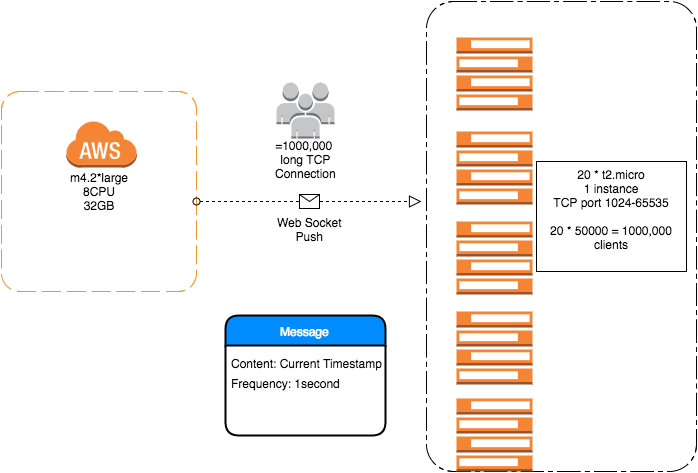
I am using AWS m4. 2* large as web socket server and 20 * t2.micro server as clients, because the port limited(65535) by Linux without virtual network interface.

Because some limited by EC2 network, the virtual network interface doesn’t work in fact.If it is the local network, you can do this way to create your virtual network cards easily.
ifconfig eth0:1 192.168.0.1 netmask 255.255.255.0 up
ifconfig eth0:2 192.168.0.1 netmask 255.255.255.0 up
Message content is current system timestamp, server push frequency is 1/second.
-
Java Options
export JAVA_OPTS=”-Xms16G -Xmx16G -Xss1M -XX:+UseParallelGC”
-
TCP Optimization
Server side optimisation, the configuration would handle almost 2,000,000 connection.
vi /etc/sysctl.conf
net.ipv4.tcp_wmem = 4096 87380 4161536
net.ipv4.tcp_rmem = 4096 87380 4161536
net.ipv4.tcp_mem = 786432 2097152 3145728
fs.file-max = 2000000
fs.nr_open = 2000000
net.ipv4.tcp_syncookies = 1
net.ipv4.tcp_tw_reuse = 1
net.ipv4.tcp_tw_recycle = 1
net.ipv4.tcp_fin_timeout = 30
You can easy to google the meaning of these configurations, but when turn on tcp_tw_recycle, please be careful.
It causes network reset error, because when using tcp_tw_recycle, it will check the timestamp of network package. But we can use this configuration to ignore it.
net.ipv4.tcp_timestamps=0
-
TCP/IP Range Optimization
net.ipv4.tcp_max_syn_backlog = 8192 // default is 1024
net.ipv4.ip_local_port_range = 1024 65535
net.ipv4.tcp_keepalive_time = 1200 // default is 2 hours
net.ipv4.tcp_max_tw_buckets = 5000 // default is 1800
Using this command to active the network changes.
/sbin/sysctl -p
-
Linux Optimization
vi /etc/security/limits.conf
* hard nofile 2000000
* soft nofile 2000000
root hard nofile 2000000
root soft nofile 2000000
there is a hacker way to adjust the stack size of each thread, using this command to check
ulimit -s
reduce the size to make each thread light, then it can help us to improve the throughput.
-
Client Side Implementation
We can use firefox or Chrome to simulate a simple logic like this. It will print the current date time as string like this “Tue Sep 20 2016 01:40:17 GMT+0200 (CEST)”
var handler = new WebSocket(“ws://ipaddress:port/endpoint”);
handler.onmessage = function (event) {
console.log(new Date(event.data));
}
But in the real test environment, I am using https://github.com/smallnest/C1000K-Servers as references to test.
-
Server Side Implementation
Server side, I choose Netty to build server.

Please read https://github.com/smallnest/C1000K-Servers in detail. we can use this command to make a statistics of your network status.
netstat -n | awk ‘/^tcp/ {++S[$NF]} END {for(a in S) print a, S[a]}’
LAST_ACK 13
SYN_RECV 468
ESTABLISHED 90
FIN_WAIT1 259
FIN_WAIT2 40
CLOSING 34
TIME_WAIT 28322
-
Metrics
With the beautiful metrics from datadoghq.com, in 2 hours test, the system load was very low. The network traffic was also in normal level.


-
Conclusion
Firstly, I should thank @smallnest https://github.com/smallnest answer some questions to me. In his implementation is also clean and simple in scala. Secondly, the results encourage us to build C100k server by yourself, the performance problem of connection could be conquered in the end.
 Qunfei@Data, ML and AI Architecture
Leave a comment