“All human knowledge is uncertain, inexact, and partial.” – Bertrand Russell
Last week , we had three days intensive course – AI for Managers in ESMT Berlin 📚. I like to call them workshops for management . They aim to solve business problems with machine learning knowledge. I love ❤️ the process from a business problem into actionable real business decision.
But professor only allowed use an “ancient calculator” 🧮️ to get the real answer in exam 😅. It is tough 💪, but memorable ⭐. I only write down several sessions which I had new insights.
#1 Start Simple, Combine Strategically
You don’t need deep learning or neural networks for most business problems. Classical ML methods (logistic regression, clustering, factor analysis) are:
Interpretable — you can explain the results to non-technical stakeholders
Fast — run in seconds, iterate quickly
Powerful when combined — 1+1+1 = 10
#2 The Real Skill Is Interpretation
Running the algorithm is the easy part. The hard part is:
Naming factors meaningfully (not just “Factor 1, Factor 2”)
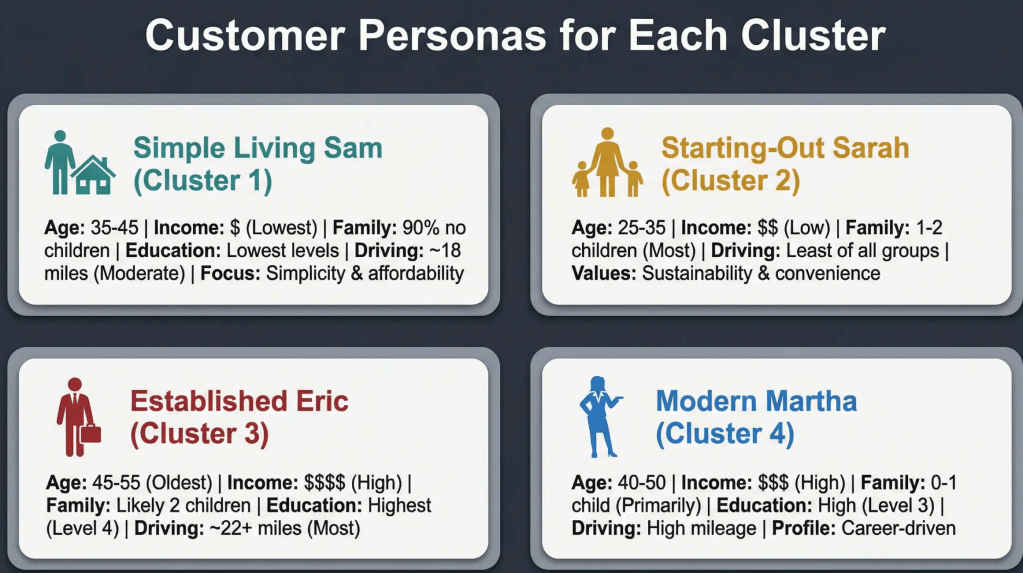
Interpreting cluster profiles (turning numbers into customer personas)
Translating coefficients into business recommendations
Machine learning amplifies your judgment, it doesn’t replace it.
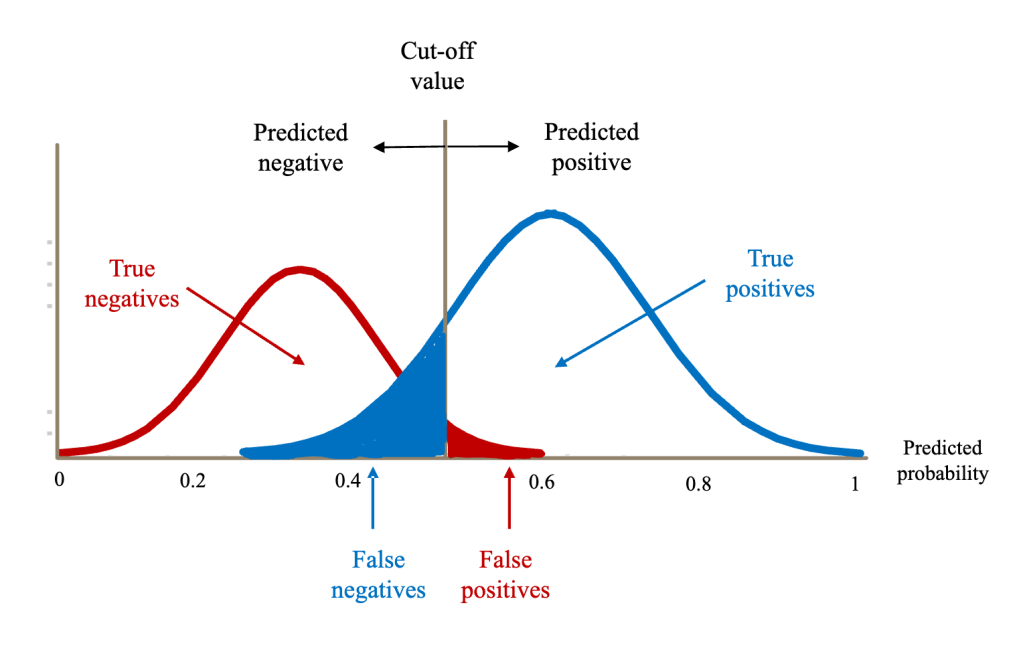
As management, you need to make trade-offs, cut-off value.
#3: All Models Are Wrong, But Some Are Useful
The course drilled this into us from day one. No algorithm gives you “the answer.” Machine learning models offer insights, patterns, and probabilities—but you still need to make the decision. The real skill isn’t running the algorithm. It’s knowing when to trust it, when to question it, and how to combine it with business knowledge.
What this means in practice in class:
Factor Analysis told us there are preference dimensions—but WE named them and interpreted what they meant
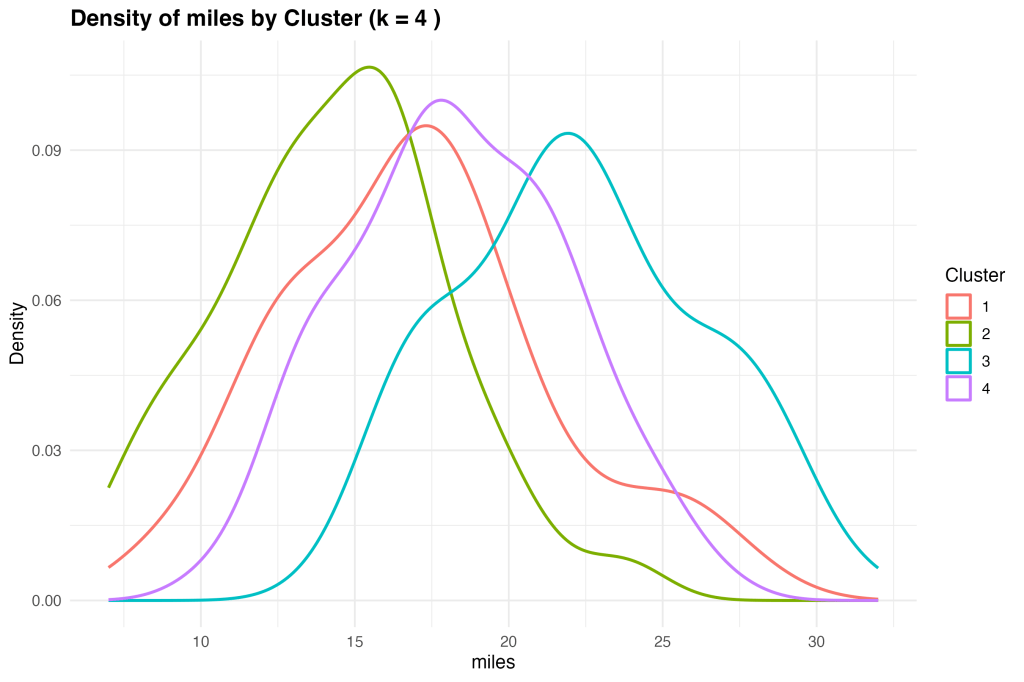
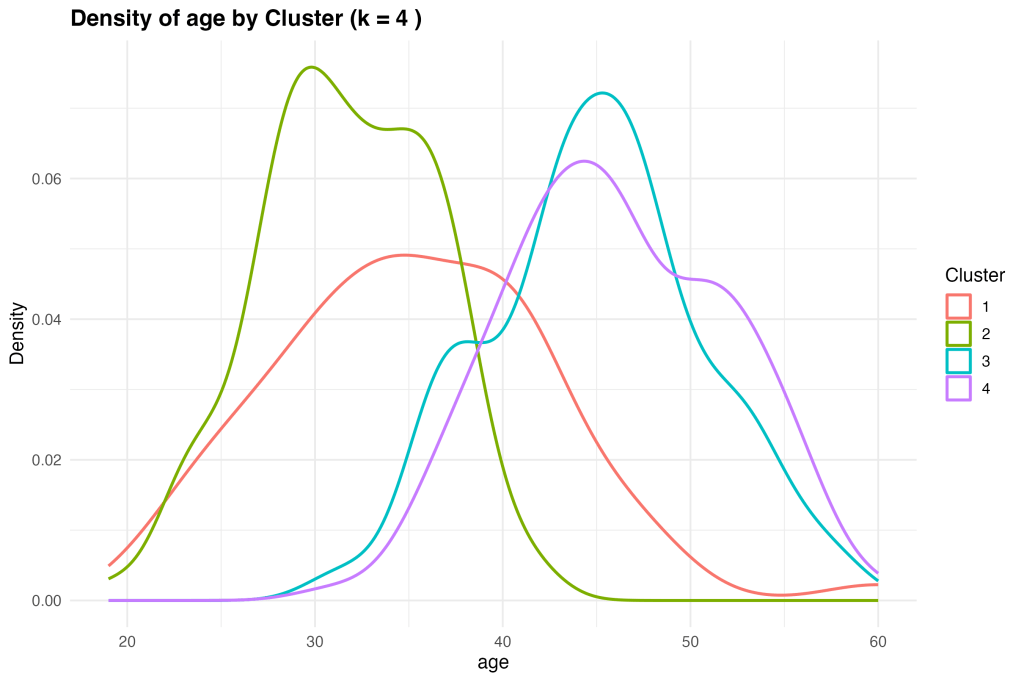
K-means gave us customer clusters—but WE decided how to target each segment
Logistic Regression predicted who would like the product—but WE chose the marketing strategy
#4: Integration Beats Perfection
Instead of searching for the “perfect” ML method, we learned to chain multiple simple techniques together.
Think of it like cooking: you don’t need one magical ingredient. You need the right combination of ingredients, each serving its purpose.
In the course, Microvan project:
Factor Analysis = Prep work (cleaning and organizing ingredients)
Clustering = Understanding your audience (who are we cooking for?)
Logistic Regression = The final dish (what will they love?)
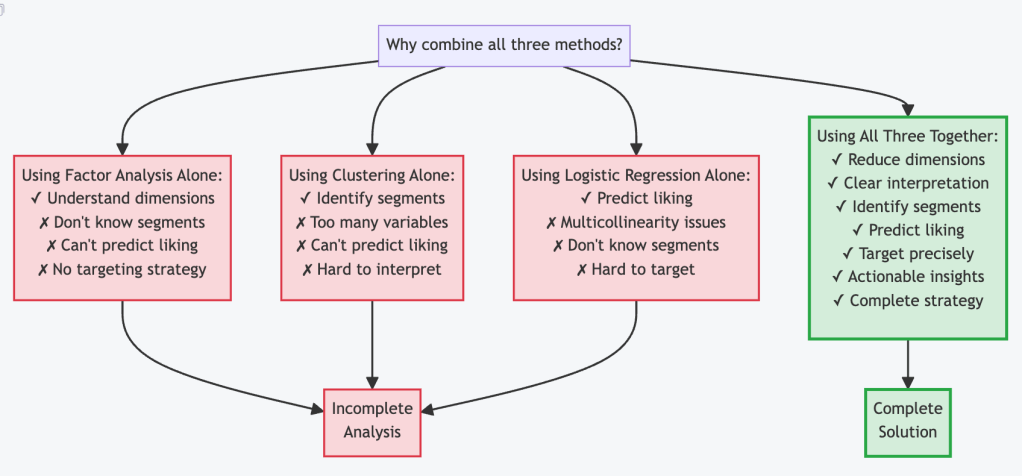
Alone, each method gives limited insight. Together, they create a complete strategy.
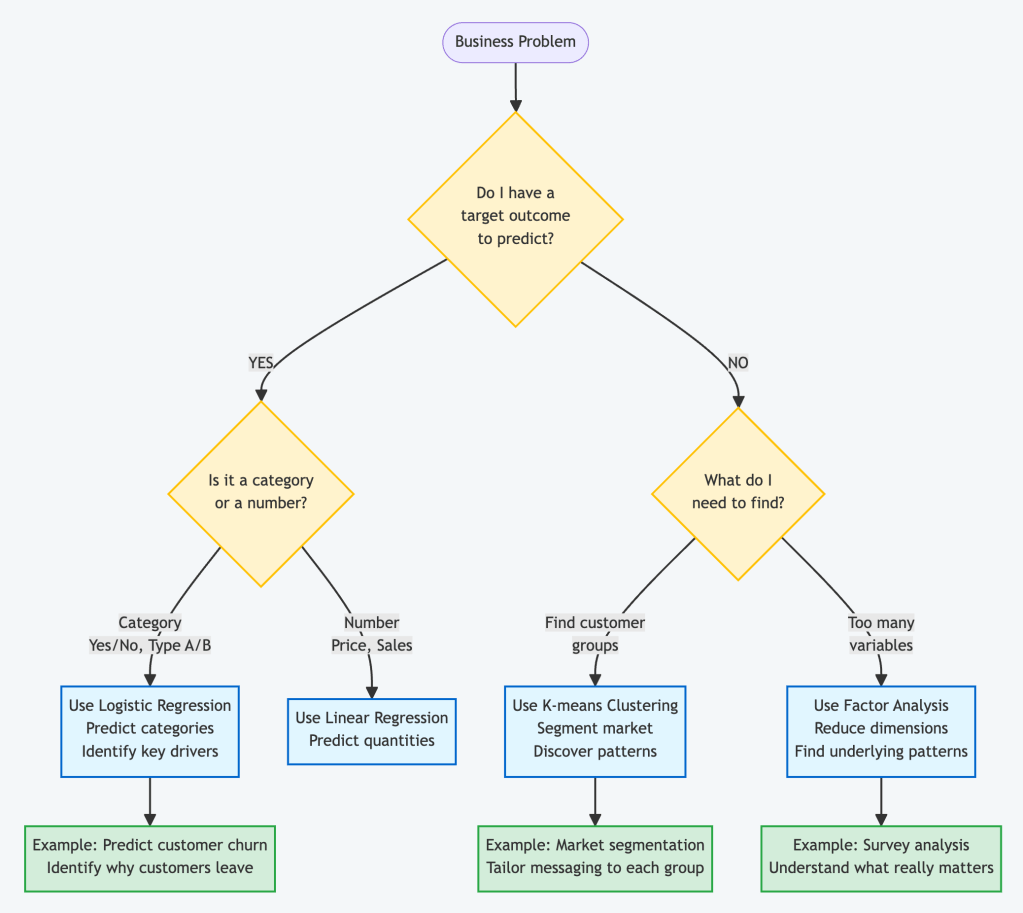
#3 A Practical Business Decision Framework
The key insight: Most real business problems need MULTIPLE methods working together.
#5 A Real World Automotive Case
The Challenge
Our automotive company was developing a new Microvan. We had:
Survey data from 500 potential customers
15 different vehicle feature ratings (style, safety, price, etc.)
One crucial question: Who should we target, and what should we emphasize?
The Problem We Faced
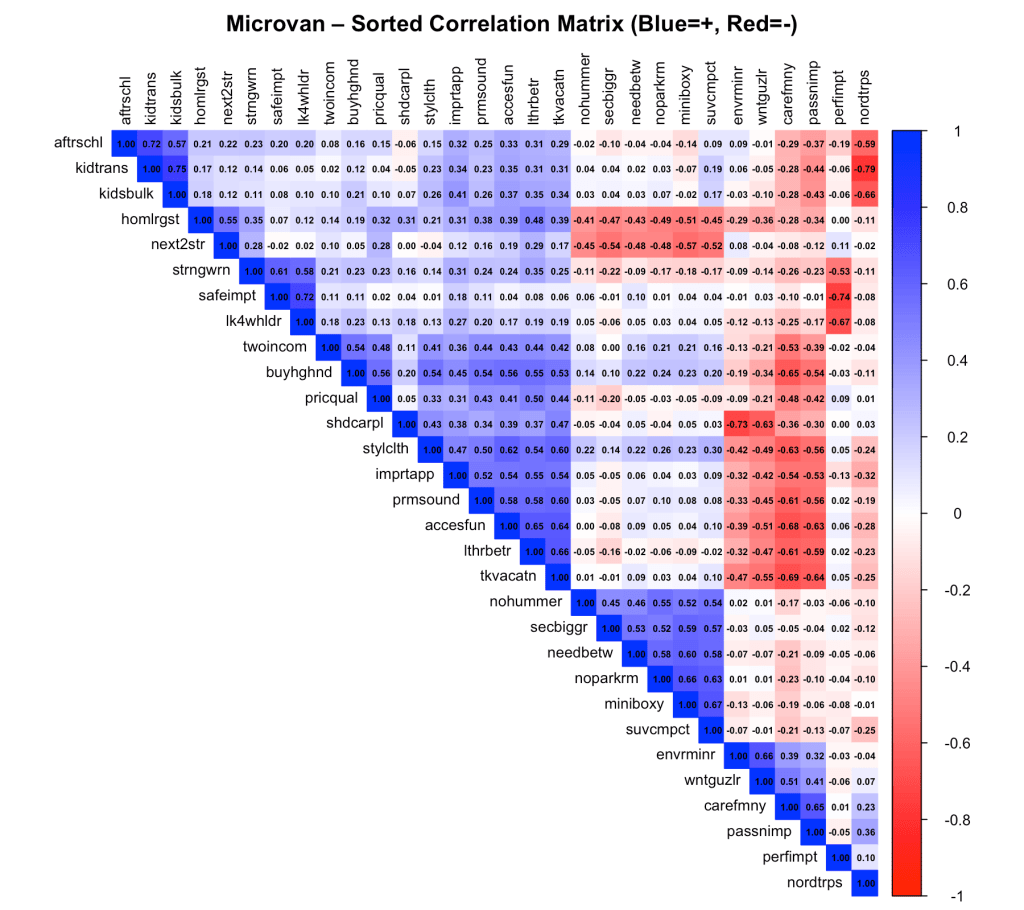
Looking at 15 different variables was overwhelming. Customers who liked “modern design” also liked “sporty appearance” and “interior space”—everything was correlated. We couldn’t just build a regression model because of high correlation (when variables are too similar, the model gets confused).We learned a systematic problem solving.
How We Solved It
Phase 1: Understanding What Customers Really Care About (Factor Analysis)
The Question: “What are the underlying preference dimensions?”
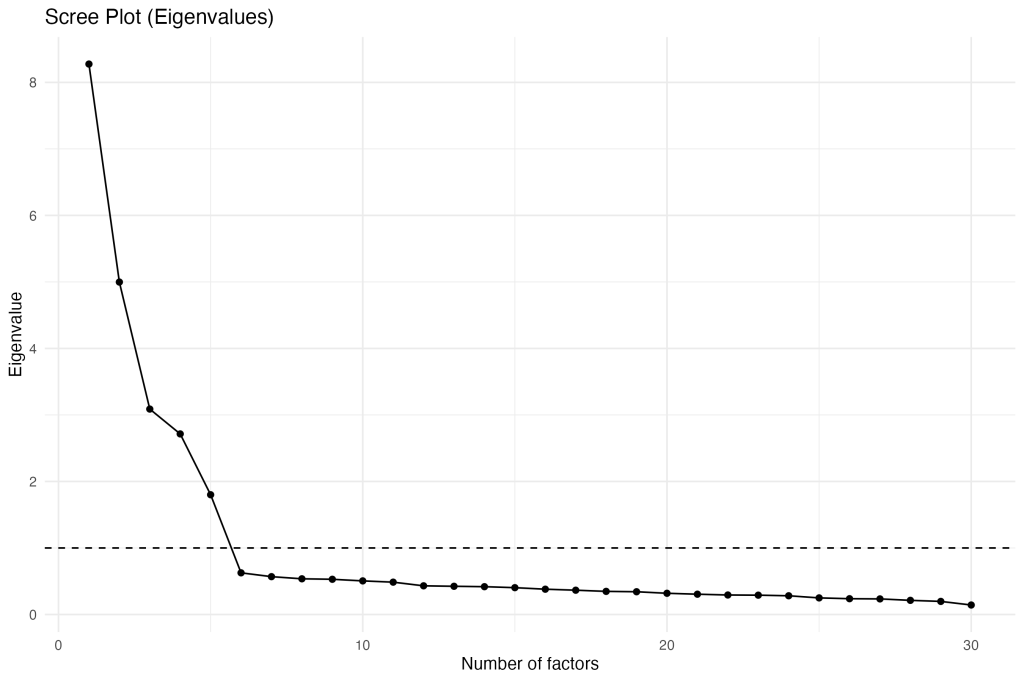
What We Did: Instead of looking at 15 separate features, we used Factor Analysis to find underlying patterns.
Key Insight: Customers don’t think about 15 separate features. They think about Style, Safety, and Value. This simplified everything. Mathematical: We converted each customer’s 15 ratings into 5 “factor scores”—a much cleaner dataset.
Regression model ==========================================
Call: lm(formula = mvliking ~ F1 + F2 + F3 + F4 + F5, data = scores)
Residual standard error: 2.205 on 394 degrees of freedom Multiple R-squared: 0.3365, Adjusted R-squared: 0.3281 F-statistic: 39.97 on 5 and 394 DF, p-value: < 0.00000000000000022
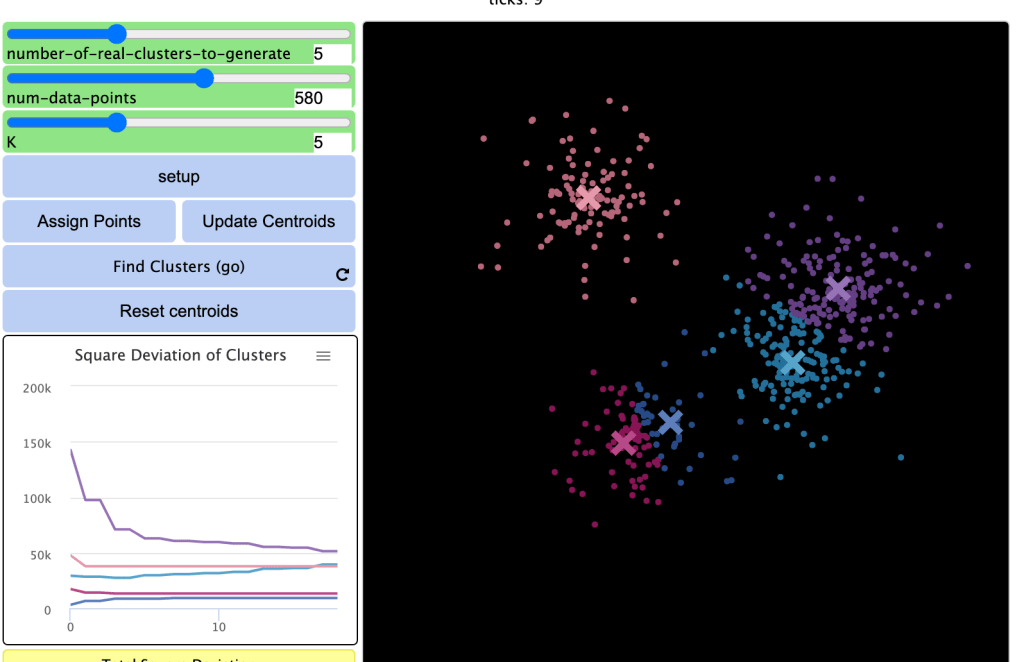
The Question: “Are there distinct types of customers?”
What We Did: Using those factor scores, we ran K-means clustering to find natural customer groups.
With these data, we converted into a real persona matrix
Cluster centers (z-score means on factors), k = 4
Cluster
F1
F2
F3
F4
F5
1
-0.78
0.15
0.44
-0.03
-1.30
2
-0.89
0.05
-0.51
-0.64
0.37
3
0.68
1.17
0.21
0.37
0.25
4
0.63
-1.13
0.07
0.28
0.10
Base on these inputs, my team find a good pattern to make Cluster 3 as our GO-TO-Market Primary Target. we had data-driven clarity on exactly who to target and what to say, it called “explainable ai”.
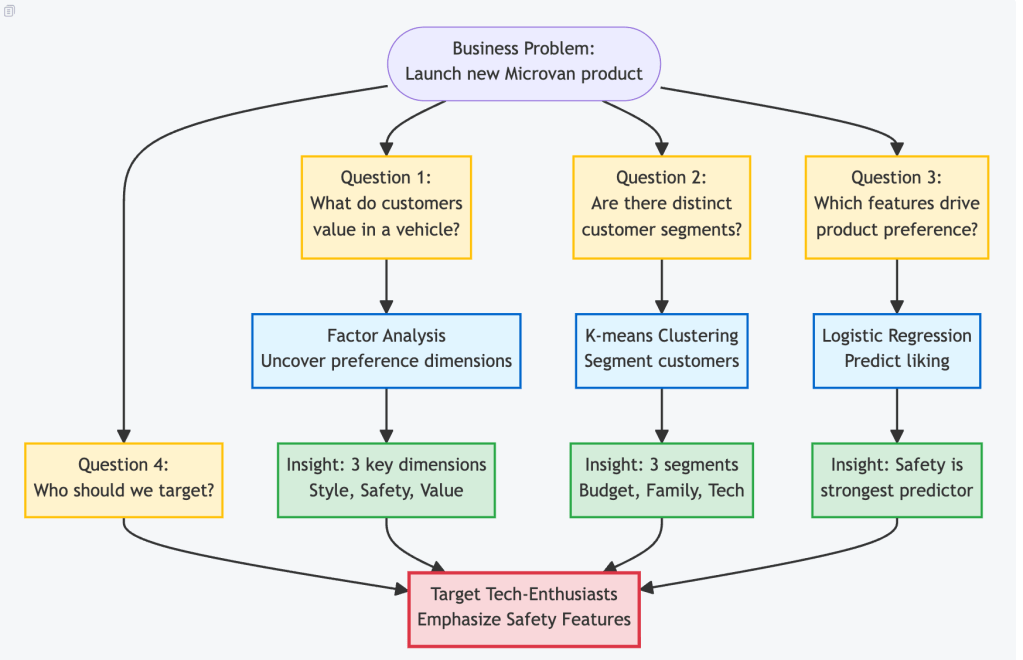
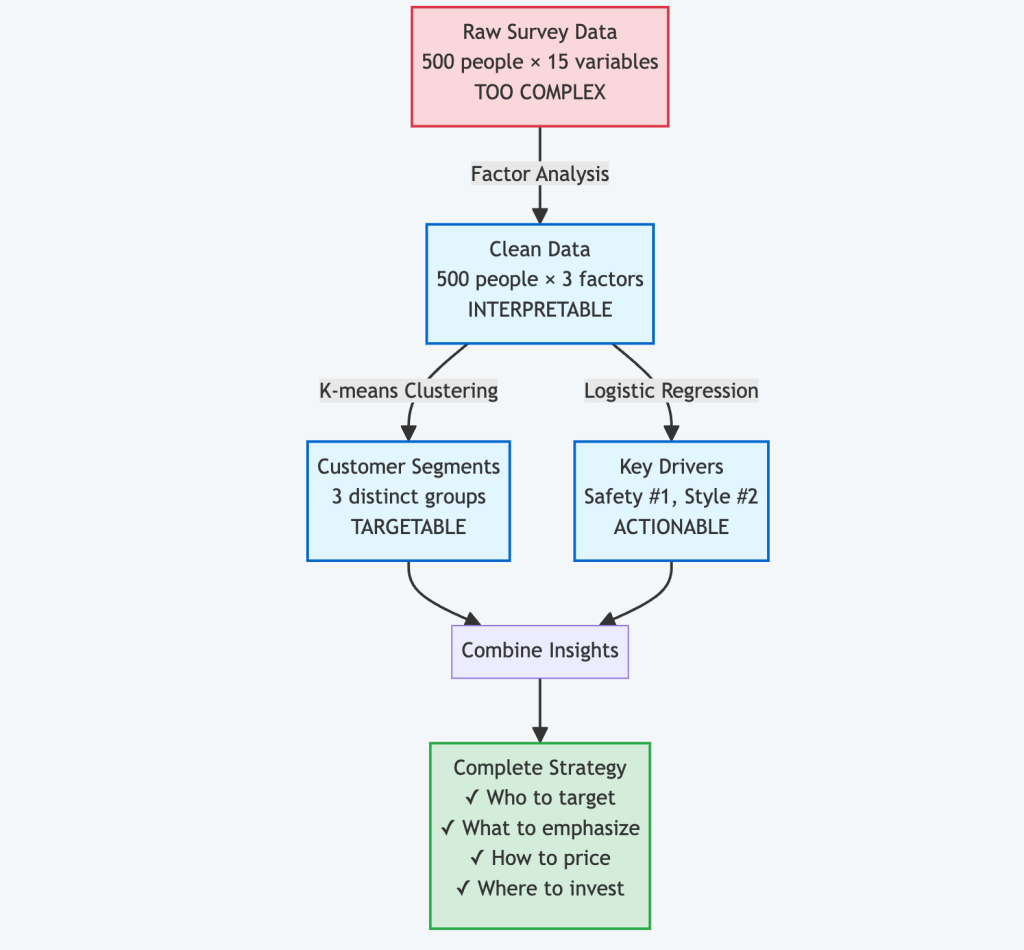
All Steps Together of Use Case
The Magic of Integration:
Factor Analysis gave us clean, interpretable dimensions
Clustering used those dimensions to find natural customer groups
Logistic Regression used those same dimensions to predict success
Together they created a complete, actionable business strategy
Each method reinforced the others. The factors made clustering easier. The clusters helped us understand predictions. The predictions validated our customer segmentation.
✈️ When AI Broke Rose’s Heart: A Travel Insurance Story That Changed Everything, The future story of how one woman’s denied claim exposed a hidden bias in artificial intelligence 🧠⚖️ — and the data scientist who fixed it 🛠️
⚠️ Disclaimer: This narrative is fictional and intended for educational purposes.
All insurance outcomes, accuracy figures 📈, and datasets 📊 are illustrative and purpose-built, not drawn from real customers.
But bias in AI is widespread because legacy data 🗂️ often encodes historical inequities that regulation alone cannot retroactively fix ⚖️. Our goal is to show that bias can be detected 🔎, measured 📏, and mitigated 🧰 — and yes, we can fix it ✅.
Notebook, Python Code is for data scientist, engineer to download
Rose and Jack 👫 had been planning their dream vacation to New York 🗽 for months. The flights ✈️ were booked. The hotels 🏨 were confirmed. Their suitcases 🧳 were packed with excitement for their first trip together.
But as fate would have it, their perfect getaway took an unexpected turn ⚠️.
🗽 Day 3 in New York City 📍 JFK Airport, Terminal 4
“Sir, ma’am, I’m sorry…” The airline representative’s voice trailed off as Rose’s heart sank. Their luggage — containing Jack’s camera equipment, Rose’s carefully planned outfits, and precious souvenirs — had vanished somewhere between connections.
Total loss: $1,847 worth of belongings.
But they had travel insurance. “At least we’re covered,” Jack said, squeezing Rose’s hand.
They never imagined that artificial intelligence would soon judge them differently — not based on their claim, but based on who they were.
📝 Two Identical Claims, Two Different Outcomes
Jack’s Experience (5 days later)
📧 Email Notification Subject: CLAIM APPROVED ✅
Dear Jack, Your claim for $1,847 has been approved. Payment will be processed within 3-5 business days.
Status: APPROVED IN 5 DAYS
Rose’s Experience (5 days later)
📧 Email Notification Subject: CLAIM UPDATE ❌
Dear Rose, After careful review, we regret to inform you… Your claim has been denied.
Status: REJECTED
Same flight. Same lost luggage. Same insurance company. Different genders. Different outcomes.
Rose was devastated. “Why would they approve Jack’s claim but deny mine?” she asked, tears welling up. “We lost the exact same things.”
📞 The Call That Changed Everything
“I need to speak to a manager,” Rose insisted, her voice steady despite the frustration.
That’s when Laura, the company’s senior data scientist responsible for its AI claim, taking care this issue to analysis. What she discovered would shake the entire organization.
“This can’t be right…” Laura muttered, her fingers flying across the keyboard as she dove into the data.
The AI wasn’t consciously discriminating — it had learned from biased historical data. Here’s what Laura discovered:
The AI’s Learning Process (The Problem) ╔════════════════════════════════════════╗ ║ 📚 Historical Claims Data ║ ║ ├─ 70% from male customers ║ ║ ├─ 30% from female customers ║ ║ └─ Legacy of human bias ║ ║ │ ║ ║ ▼ ║ ║ 🤖 AI Model Training ║ ║ ├─ “Learn patterns” ║ ║ ├─ Males = higher approval rate ║ ║ └─ Pattern becomes decision rule ║ ║ │ ║ ║ ▼ ║ ║ ⚖️ New Claims Processing ║ ║ ├─ Apply learned patterns ║ ║ ├─ Same claim, different gender ║ ║ └─ Different outcome = DISCRIMINATION ║ ╚════════════════════════════════════════╝
The heartbreaking reality: Rose wasn’t denied because her claim was invalid. She was denied because she was female which is the big factor.
🛠️ The Fix: Teaching AI to Be Fair
Laura knew she couldn’t change the past data, but she could fix the future. She turned to Fairlearn, a Microsoft toolkit designed to detect and mitigate AI bias.
Step 1: Measuring the Bias
Before she could fix the problem, Laura needed to quantify it. She used a key metric from the Fairlearn toolkit: Demographic Parity Difference. This metric calculates the difference in approval rates between the most and least advantaged groups.
A value close to zero means everyone has a roughly equal chance of getting their claim approved, regardless of their gender. A high value, however, signals a major problem.
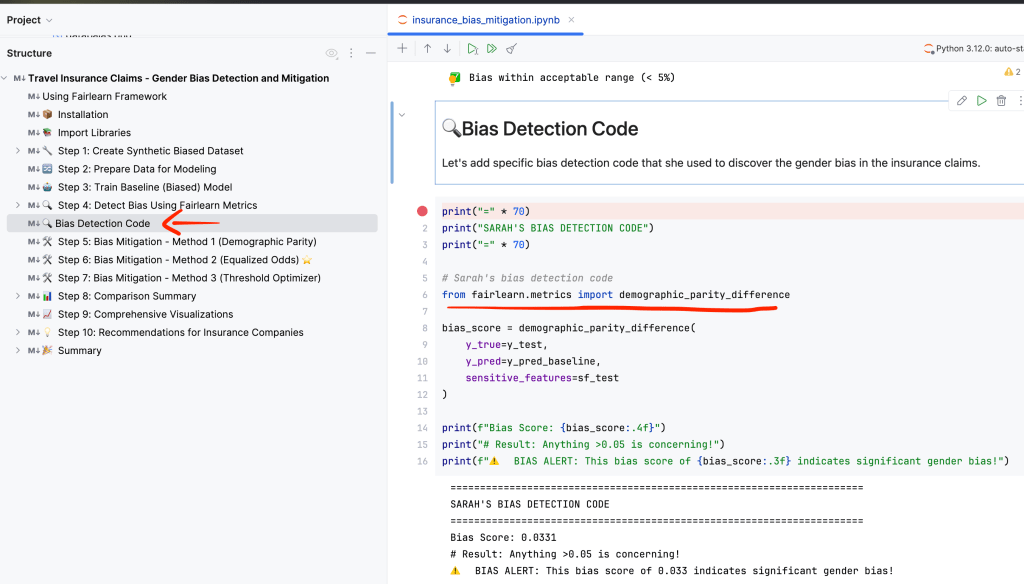
# Laura's bias detection code
from fairlearn.metrics import demographic_parity_difference
# Compare actual outcomes vs. AI predictions
bias_score = demographic_parity_difference(
y_true=actual_claims,
y_pred=ai_predictions,
sensitive_features=customer_gender
)
print(f"Initial Bias Score: {bias_score:.3f}")
# Result: 0.336 — an extremely high score!
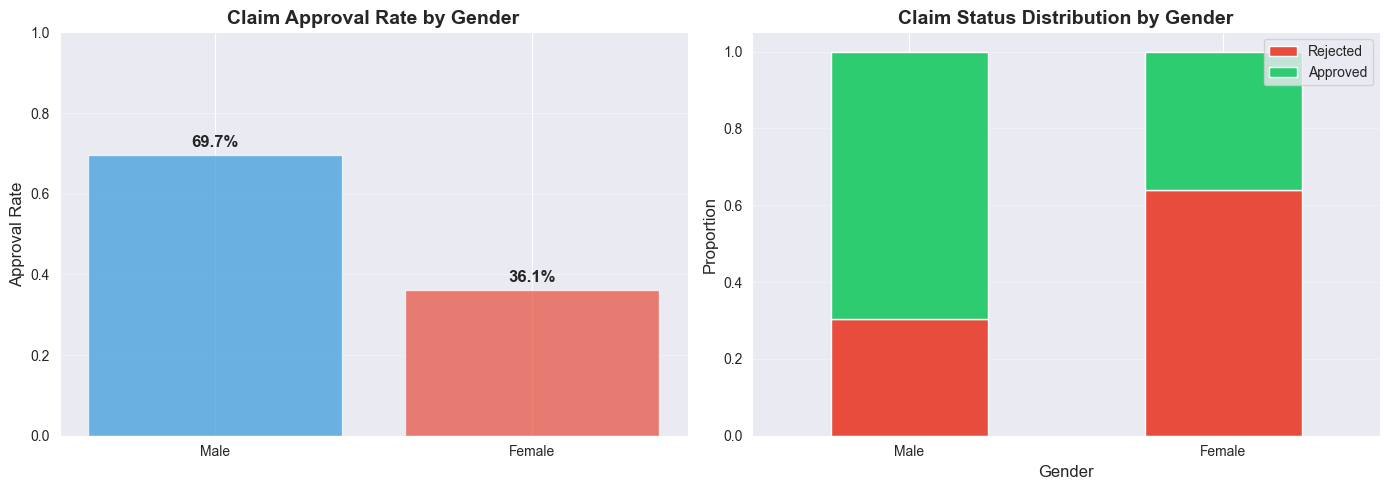
The result of 0.336 confirmed her fears. It was concrete proof that the system was heavily skewed. To make this clear to her team, she also visualized the disparity.
Initial Gender Bias Chart
The bar chart showed that males were being approved at a rate of 69.7%, while females were only approved 36.1% of the time. This meant males had a 1.93x higher chance of getting their claim approved. The data was undeniable.
Step 2: Three Mitigation Solutions Benchmark
Laura knew there was no one-size-fits-all solution for fairness. She decided to test three different mitigation strategies available in Fairlearn to find the best balance between reducing bias and maintaining the model’s accuracy.
Here’s a summary of her findings:
Fairness Experiments
Key Metrics Interpretation
Metric
Baseline (Biased)
After Mitigation (Fair)
Improvement
DP Difference
0.033
0.020
40% ✅
Accuracy
59.0%
57.3%
-1.7% (minor)
Male Approval Rate
61.0%
60.0%
Fairer Outcome
Female Approval Rate
57.7%
62.0%
Fairer Outcome ✅
Trade-offs:
Mitigation reduces bias but may slightly reduce accuracy
Different constraints optimize for different fairness notions
Choose based on your fairness requirements and regulatory needs
Method 1: Demographic Parity
This method aims for the most straightforward definition of fairness: equal approval rates for all groups. The goal is to make the selection_rate (the percentage of people approved) the same for both men and women.
Goal: Make approval rates identical.
Result: While it successfully reduced the demographic_parity_difference to 0.049 (a huge improvement!), it came at a cost. The overall accuracy of the model dropped, meaning it made more incorrect decisions for everyone.
Verdict: Not ideal. It achieved fairness by sacrificing too much accuracy.
# Method 1: Forcing approval rates to be the same
from fairlearn.reductions import ExponentiatedGradient, DemographicParity
mitigator_dp = ExponentiatedGradient(
estimator=LogisticRegression(),
constraints=DemographicParity() # Goal: Equal selection rates
)
Method 2: Equalized Odds ⭐ WINNER
This approach is more nuanced. It aims for equal error rates across groups. In this context, it means ensuring that the rates of false positives (approving a fraudulent claim) and false negatives (denying a valid claim) are the same for both men and women.
This is often the preferred method in scenarios like insurance or lending, where the consequences of errors are high.
Goal: Make sure the model makes mistakes at the same rate for everyone.
Result: This was the clear winner. It reduced the equalized_odds_difference to just 0.020, a 40% reduction in bias from the original model. Crucially, it did so while maintaining a strong level of accuracy.
Verdict: The best of both worlds — significantly fairer without compromising performance.
This is a post-processing technique, meaning it doesn’t retrain the model. Instead, it adjusts the decision threshold (the score needed to approve a claim) for each group separately. It’s a quicker fix but often less robust.
Goal: Find different approval thresholds for each group to balance outcomes.
Result: It offered a decent improvement, reducing bias by 27% (demographic_parity_difference of 0.045). However, it wasn’t as effective as Equalized Odds.
Verdict: A good quick fix, but not the most thorough solution.
# Method 3: Adjusting the decision threshold after prediction
from fairlearn.postprocessing import ThresholdOptimizer
threshold_optimizer = ThresholdOptimizer(
estimator=base_model,
constraints="demographic_parity"
)
Email Notification
Subject: CLAIM RE-EVALUATION
Dear Rose,
After system improvements, your claim
has been re-evaluated and APPROVED.
Payment of $1,847 is being processed.
We apologize for the inconvenience.
Laura’s fix was deployed company-wide. Within a month:
🎯 40% reduction in gender bias
💼 $0 spent on discrimination lawsuits
❤️ Customer satisfaction scores improved
🏆 Industry recognition for ethical AI
🎓 Key Takeaways (What You Need to Know)
For Everyone
1️⃣ AI learns from historical data │ 2️⃣ Historical data contains bias │ 3️⃣ AI learns and repeats bias │ 4️⃣ This affects real people! 😢 │ 5️⃣ But we CAN fix it! ✅ │
For Business Leaders
Bias audits should be mandatory
Fairness metrics need tracking
Diverse teams build better AI
Transparency builds customer trust
Ethical AI is good business
🌟 The Choice, Red or Blue ?
Rose and Jack’s story isn’t just about travel insurance — it’s about the future of artificial intelligence. As AI makes more decisions about our lives, ensuring fairness becomes critical.
Path A: Ignore Bias 😈 ║ ║ ├─ Discrimination continues ║ ║ ├─ Legal liability grows ║ ║ ├─ Customer trust erodes ║ ║ └─ AI becomes a tool of oppression ║ ║ ║ ║ Path B: Fix Bias 😇 ║ ║ ├─ Fair decisions for all ║ ║ ├─ Legal compliance achieved ║ ║ ├─ Customer trust earned ║ ║ └─ AI becomes a force for good ║
Laura chose Path B. Every day, more data scientists are choosing fairness over convenience.
Key Takeaways
✅ Bias is real, measurable, and fixable. It’s not a mysterious force; it’s a data problem we can solve.
✅ Fairlearn provides effective, easy-to-use tools for both detecting and mitigating bias.
✅ A small trade-off in accuracy can lead to a significant improvement in fairness.
✅ Choose the right fairness constraint for your use case. Different scenarios require different definitions of “fair.”
Note: This narrative is fictional and created for educational purposes. All accuracy numbers and datasets are illustrative and purpose-built, not real customer data. Bias is widespread, and legacy data cannot be rewritten by regulation alone — that’s the core challenge we must solve. The good news: with measurement, audits, better data, and mitigation techniques, we can fix it.
Communication is not just about talking — it’s about connection. In every meaningful exchange, we dance between expressing ourselves and truly hearing others.
Fred Kofman, in “The Dance of Communication”, reminds us that good communication is less about control. It is more about awareness. It also involves humility and curiosity.
Here’s how I’ve learned to apply this idea — from my leadership course at ESMT Berlin.
🌟 Step 1: Ask Yourself Before You Speak
Before any conversation begins, pause and reflect. These questions help me center my mindset — not just my message:
🌟 Focus
🧠 Reflective Question
💬 Purpose
🎯 Intention
“What is my real purpose in this conversation?”
To clarify if you want to learn, solve, or just express.
🤔 Assumptions
“What assumptions or judgments am I bringing into this talk?”
To reduce bias and stay open-minded.
❤️ Attitude
“Am I ready to listen with empathy and respect?”
To remind yourself to stay calm and kind.
🧩 Outcome
“What outcome would be meaningful for both of us?”
To focus on collaboration, not competition.
🪞 Self-Awareness
“Am I speaking to learn or to win?”
To balance advocacy 🗣️ and inquiry ❓.
🧮 Step 2: Advocacy vs. Inquiry — Finding the Balance
Communication thrives when we share to learn (advocacy) and listen to understand (inquiry).
Speak to learn, not to win 🧘♂️
Balance advocacy 🗣️ and inquiry ❓
Lead with humility 🙇, curiosity 🔍, and respect 🤝
🗣️ Step 3: Practice the Dance — Advocacy and Inquiry in Action
🌟 Topic
💡 Core Idea
🧭 Practice / Example
🤝 1. The Power of Conversation
Conversations can change beliefs, perceptions, and actions.
Communicate with openness ❤️ and curiosity 🧠, not control 🔒.
🚫 2. The Problem: Unilateral Control
People think “I’m right” 👑 and steer talks alone.
Focus on shared goals 🎯, not ego. Admit others may be right too 🤔.
❌ 3. Symptoms of Control
– Speak without reasoning 🗣️- Ask rhetorical questions 🎭- Hide your true views 🙊
Be transparent 🪞 with logic, data 📊, and uncertainty ❓.
🌱 4. Productive Mindset
“We need to learn together — I might be wrong.”
Shift from winning 🏆 to learning 📚.
📣 5. Productive Advocacy
Express ideas clearly and humbly 🙇.
– Show reasoning 🧮 & data 📑- Admit doubt 😌- Invite feedback 👂
👥 Example
❌ “We should hire Bill.”✅ “I think Bill fits better because of his experience — but I’d like your thoughts.”
Encourage dialogue 💬 and shared judgment ⚖️.
🔍 6. Productive Inquiry
Listen with curiosity 👂 and without judgment 🚫.
– Explain why you ask 💬- Ask open questions ❓- Check understanding ✅
💭 Good Questions
“What led you to that view?”“How do you see my role?”“Can you give an example?”
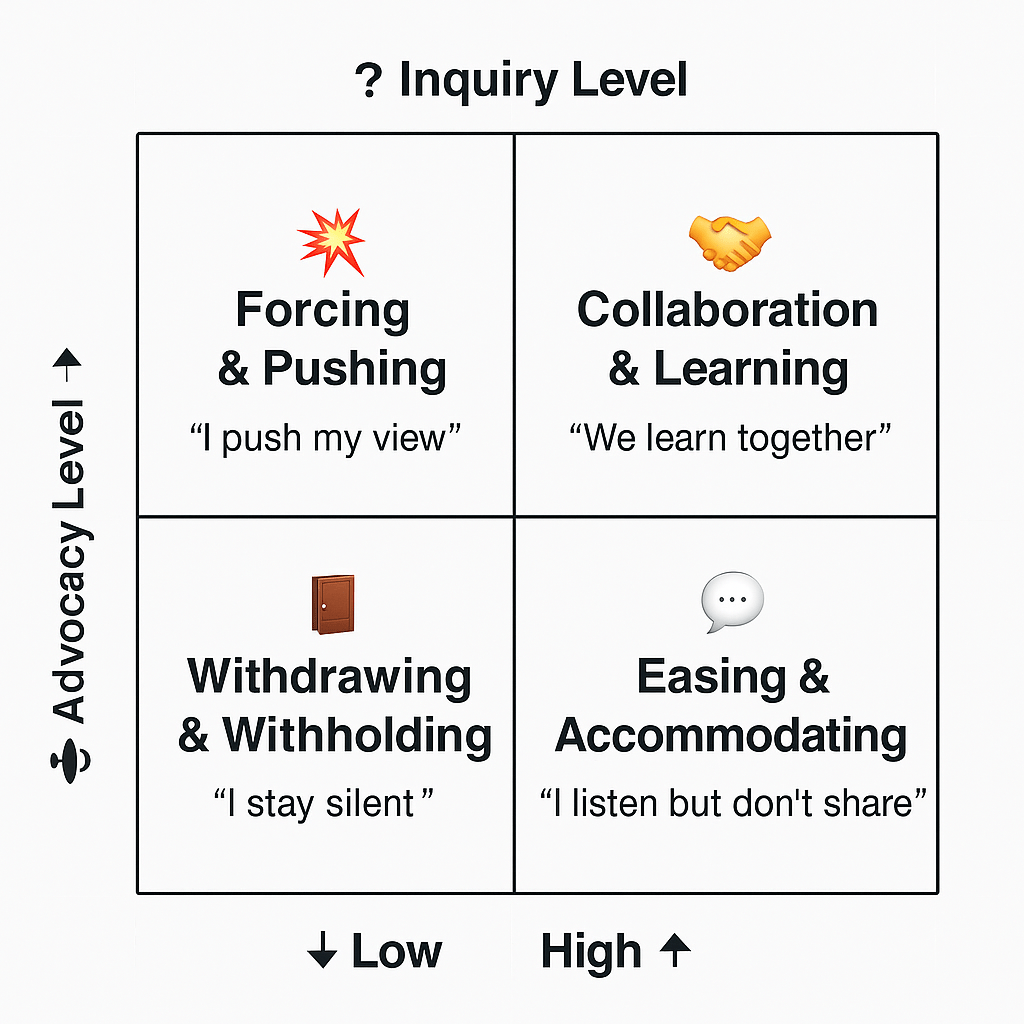
High + High → 🤝 Collaboration & Learning High + Low→ 💥 Forcing Low + High → 🕊️ Accommodating Low + Low → 🚪 Withdrawing
Balance words ⚖️ and questions ❓ for growth 🌱.
🧩 8. Handling Impasse
When stuck 😕, state the dilemma openly 🗣️ and ask for help 🆘.
– Ask what might change their view 🔄- Try new data or role switch 🔁- Co-create solutions 💡
🪞 9. Reflection Questions
1️⃣ What’s my intention? 🎯2️⃣ Learning or winning? 🧠3️⃣ What are my assumptions? 💭4️⃣ What truly matters? ❤️
Ask these before each important talk 🗣️.
Final Thought: The real skill in communication isn’t speaking well — it’s listening beautifully. Speak with intention 🎯, listen with curiosity 🔍, and lead with respect 🤝.
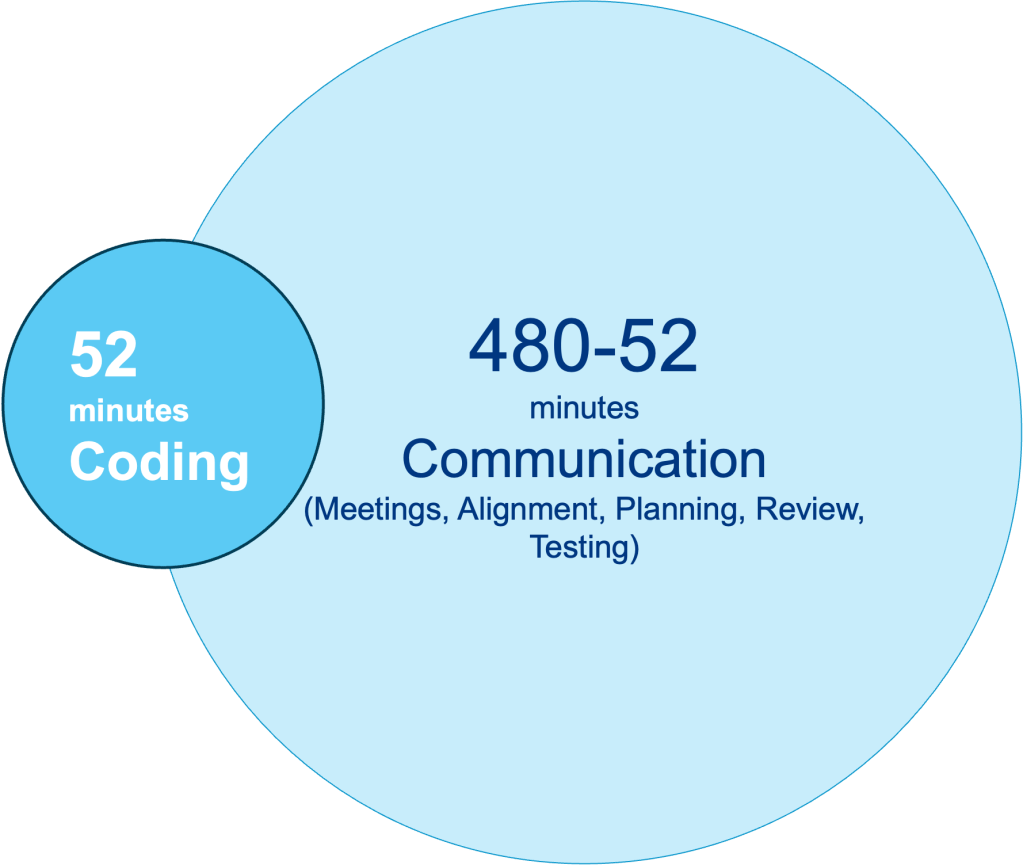
In modern software projects, most of our effort goes not into coding — but into talking in Meetings, clarifications, tickets, re-alignments, and documentation eat away precious hours. —– GitHub’s Global Code Time Report.
The average developer spends about 480 – 52 = 428 minutes per day communicating and only 52 minutes coding.
1. The Problem: 90% Communication, 10% Coding
The root cause from our daily oral speaking.
Unstructured communication brings cost.
Misunderstandings between people.
Massive rework and wasted effort.
No single source of truth.
2. The Solution: Shift From “How” to “What”
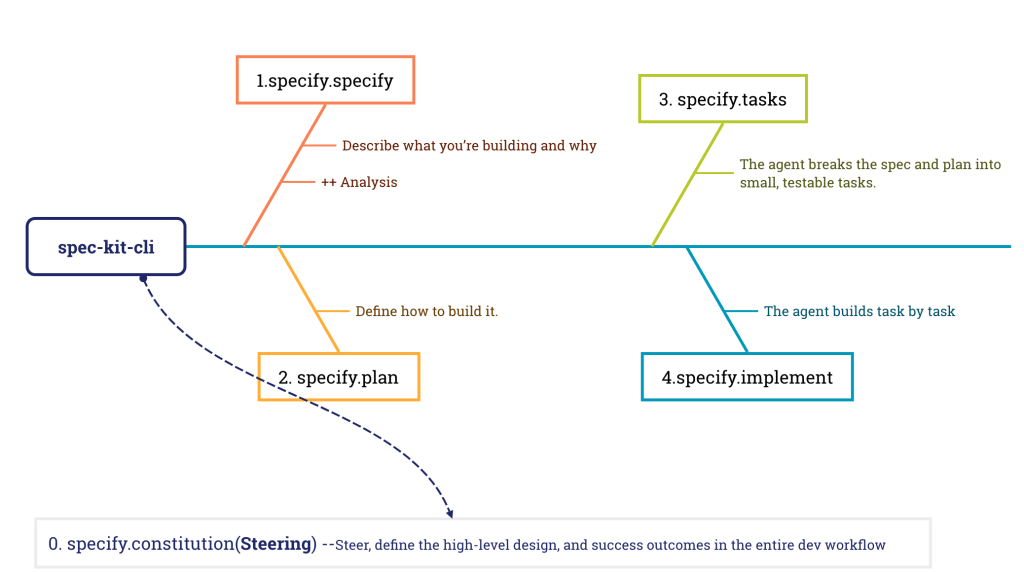
Do we have another way to fix it ? BDD, TDD, DDD or SDD
The definiation: Spec-Driven Development is a methodology that prioritizes creating clear, structured specifications. Structured specification—a single source of truth—is created before any code is written, and this specification becomes the executable contract that drives, validates, and documents the entire engineering process.
The machines not only write “Java Code”, but also write “User Story”
Specs becomes the new source code of communication
The process can be broken down into clear, validated 4 phases:
Specify: A human provides a high-level description of the feature or product, and an AI agent generates a detailed, structured specification that captures the intent, behaviors, and requirements.
Plan: The spec is translated into a technical plan outlining the architectural decisions, research tasks, and overall strategy for implementation.
Tasks: The plan is broken down into small, reviewable, and implementable tasks.
Code & Validate: AI agents generate the production code based on the tasks and specifications, and both humans and automated tests validate the outcome against the original spec.
3. The impact: Structured spec == Less talk, More build
There are two major business impacts:
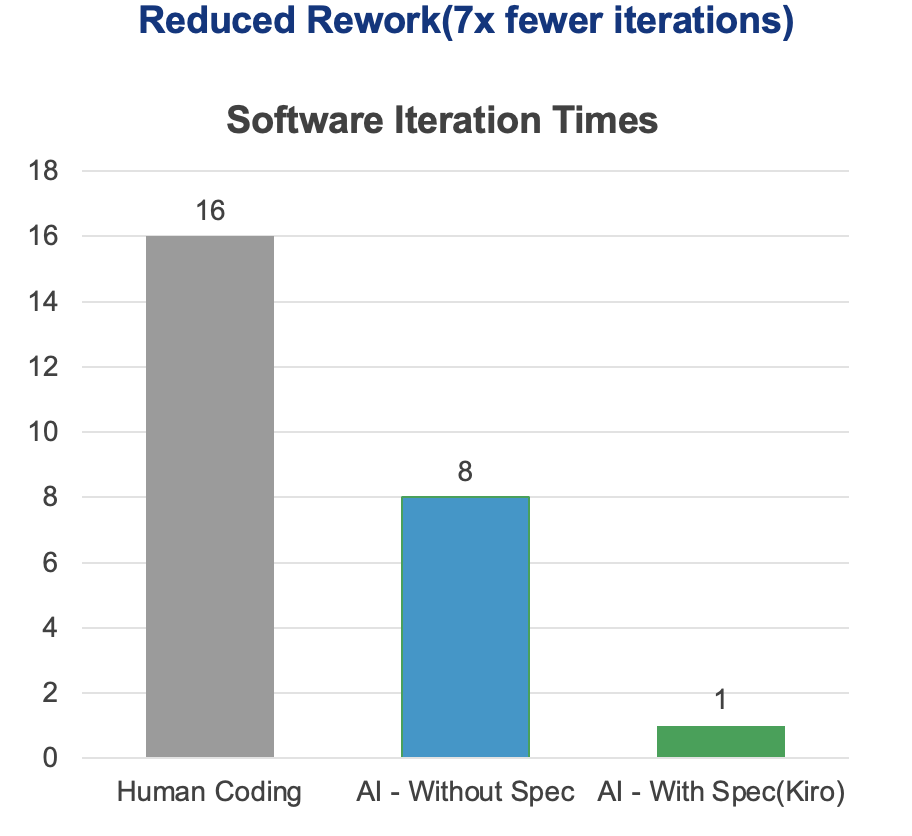
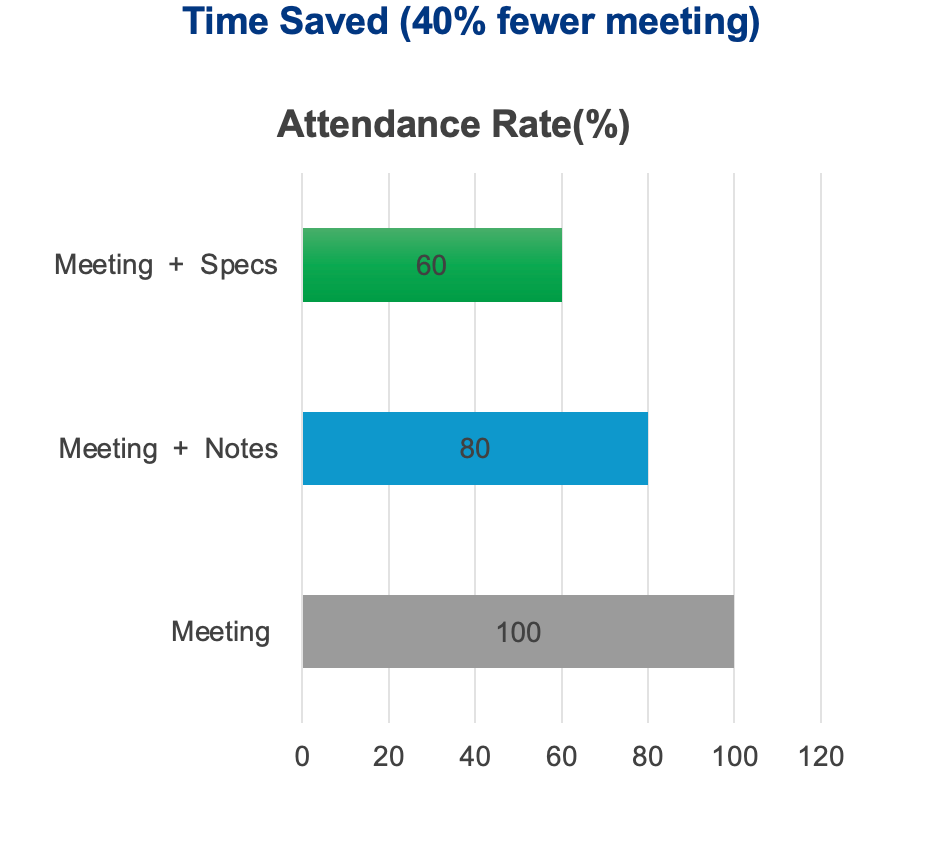
Faster Iteration: Developers spend less time in “meeting tennis” with AI and more time on high-value tasks like system design, spec review, With structured specs, teams can cut 40% fewer meetings.
By forcing a clear definition of requirements upfront, SDD reduces ambiguity and results in less rework and higher-quality, like AWS Kiro, rework drops — 7× fewer iterations than without specs.
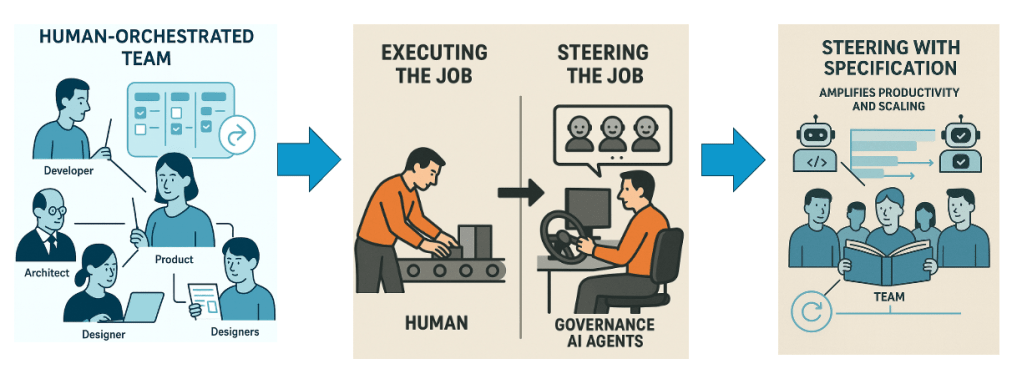
4. Role Exchange: From Execution to Steering
In the SDD paradigm, humans move up the value chain:
Traditional Role
Future with SDD
Developer
Writes and maintains specs, AI writes the code
Architect
Defines context boundaries and system desgins
QA Engineer
Validates specs and outcomes via spec-based tests
Product Manager
Prioritizes spec reuse and spec quality metrics
The result: Developers spend less time typing and more time steerring.
4. Context Engineering – How specs get selected as Context
New Code tools like (Claude Code, Codex, Cursor, Qwen Code, Trae ai) enableselect right specification as context automatically.
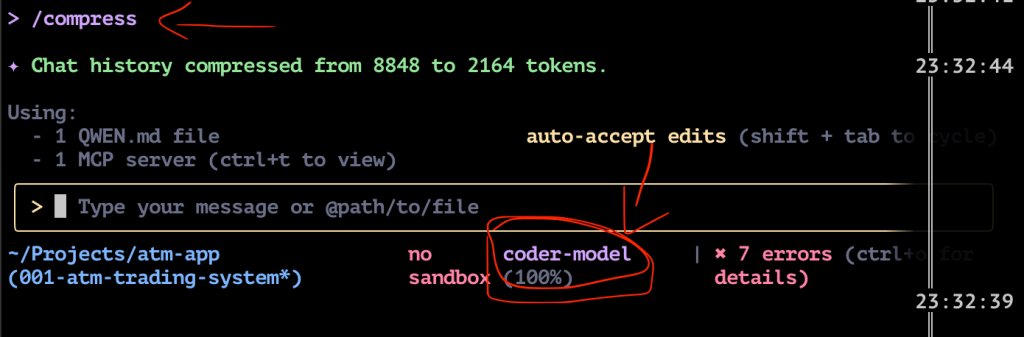
For example, in code cli tool, using compress command, the windows of context becames into 100% free.
5. Spec-Driven Tool (Kiro from AWS), easy understand.
6. Create a New Business idea in practice
An insurance company likes to introduce new Humaniod Robot insurance buiness Model.
Use Case: In Germany, a Figure 03 humanoid robot cooking in a Miele kitchen lost its camera vision due to smoke from overcooking, causing serious damage to the kitchen.
Accept Criteria: The workflow should demonstrate policy coverage evaluation and calculate the compensation amount provided.
9. Key Takeaways
Shift your mindset — from how to code → what to build.
Treat specs as assets, not overhead.
Use one SDD tool in your next sprint — measure time saved.
Build a community around shared specs (e.g. GDPR.md, AI_ACT.md).
Log improvements — time, rework, clarity.
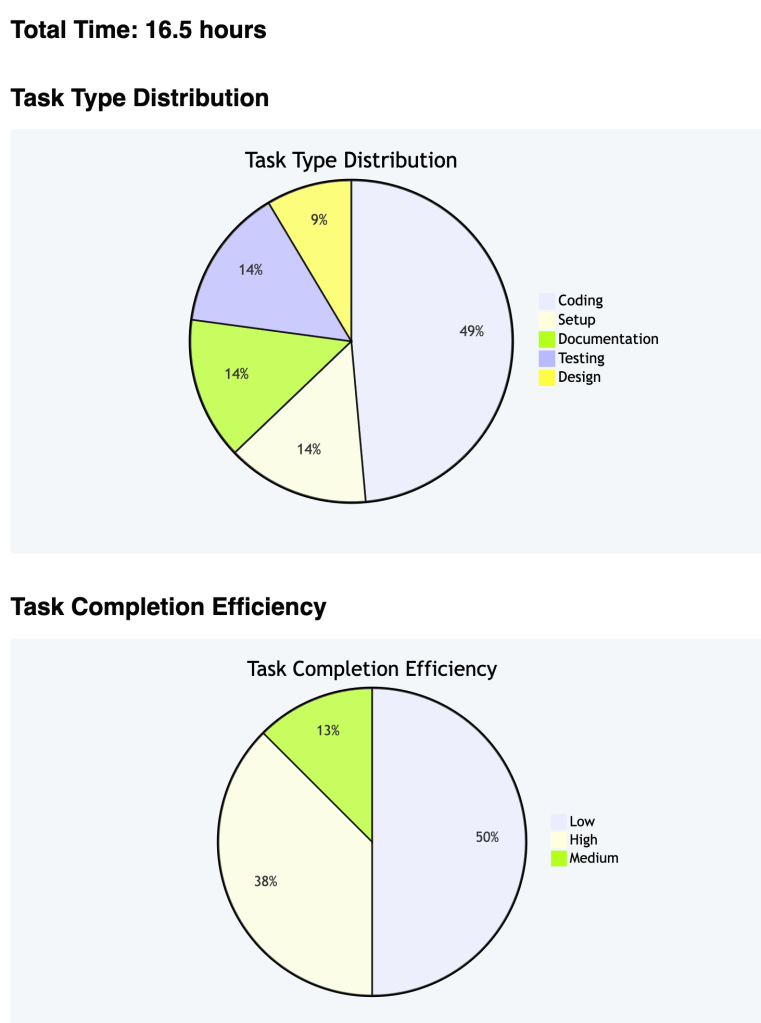
10. Time Spend in this new idea totally
11. Get Started (Technical in detail)
We are using open source stack spec-kit and Qwen cli.
uv tool install specify-cli
npm install -g @qwen-code/qwen-code@latest
cd your_project_folder
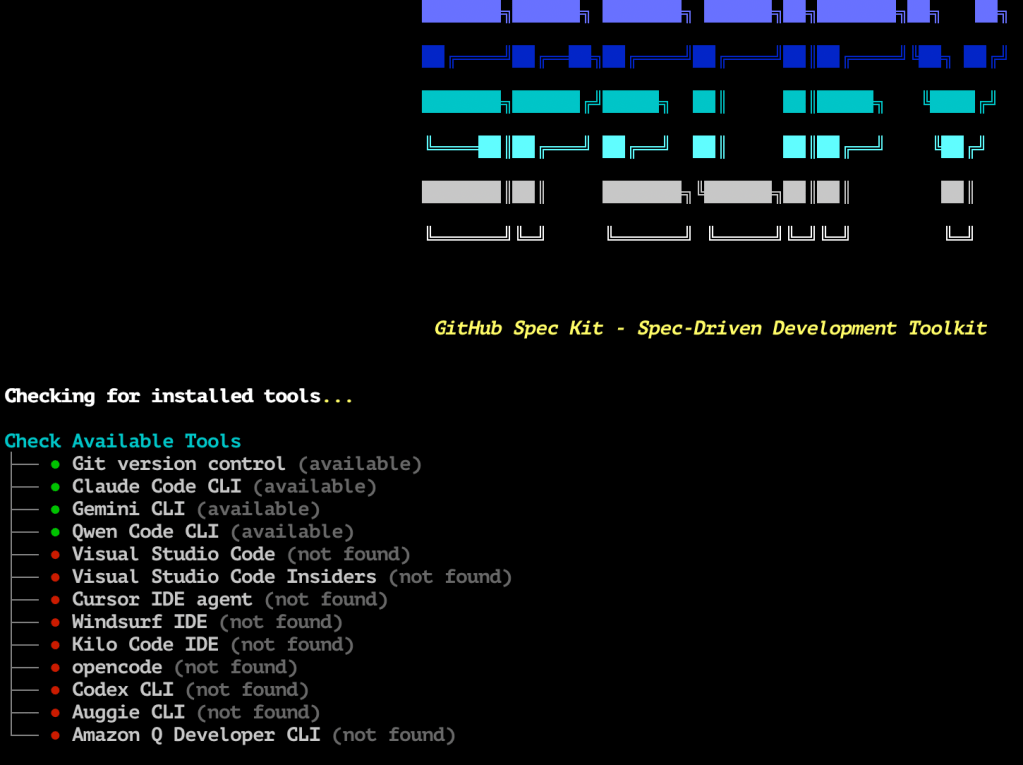
specify check # it supports many tools, but you need install the one you like.
specify.init .
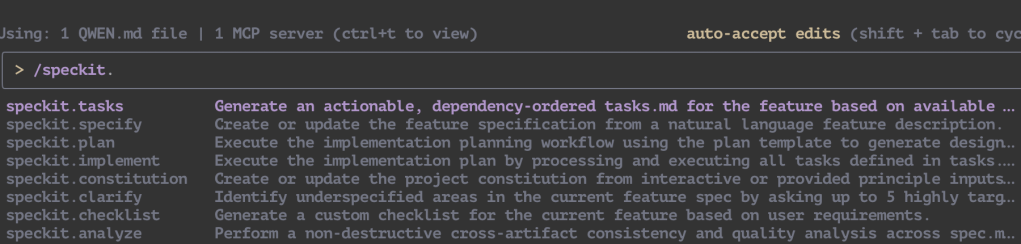
qwen # code cli https://github.com/QwenLM/qwen-code, you will find serval new command specify init/inject into code tools.
we will have a new business model from idea into reality.!!!
Results Sharing
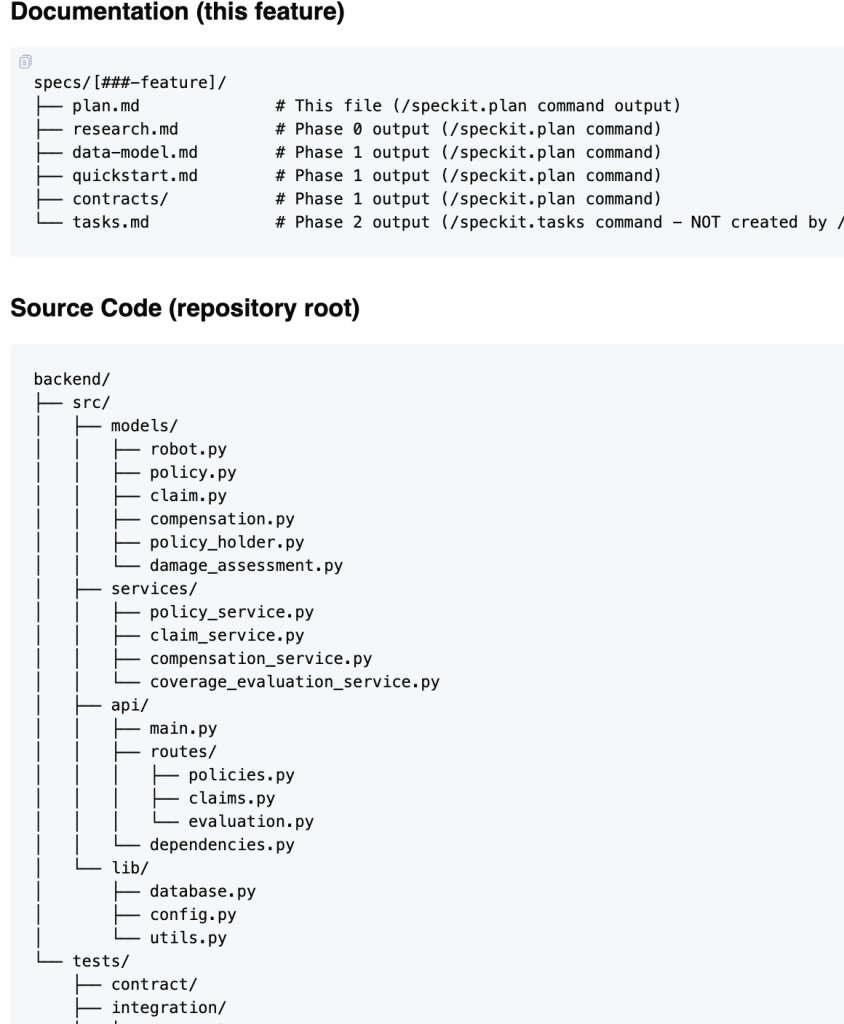
1.Project Tree with clean Architecture
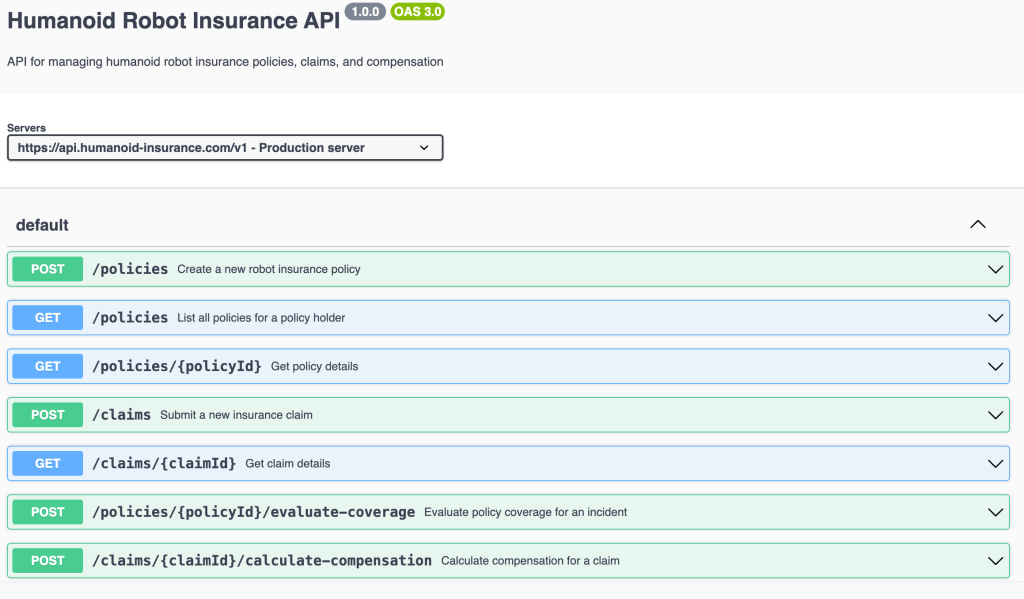
2. OpenAPI 3.0 Contract
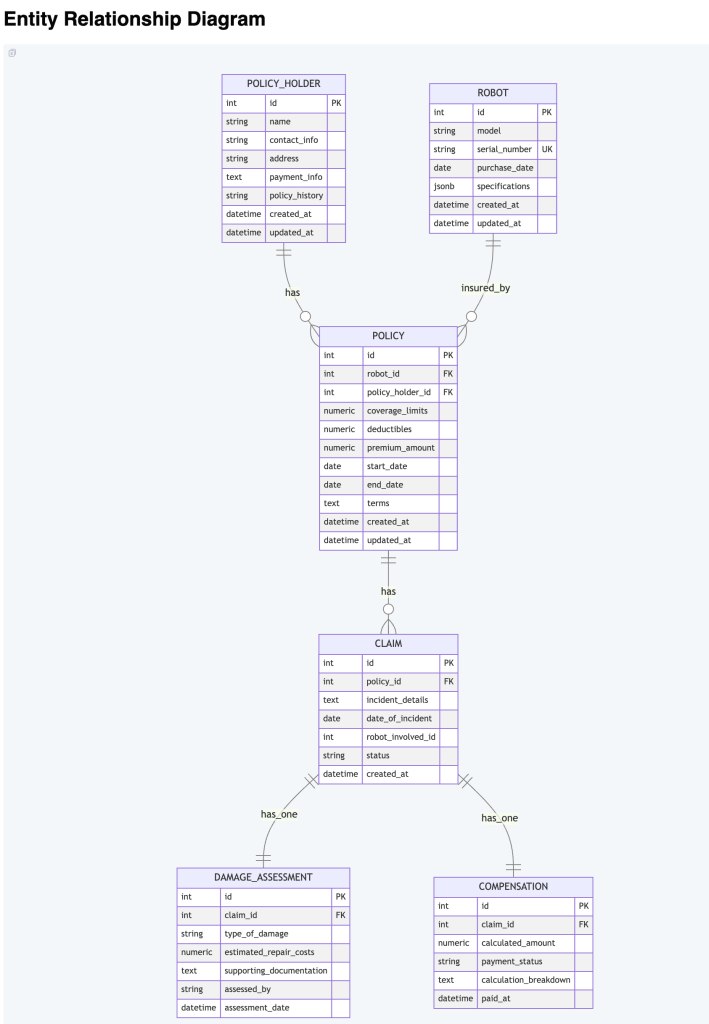
2. Data Model Design
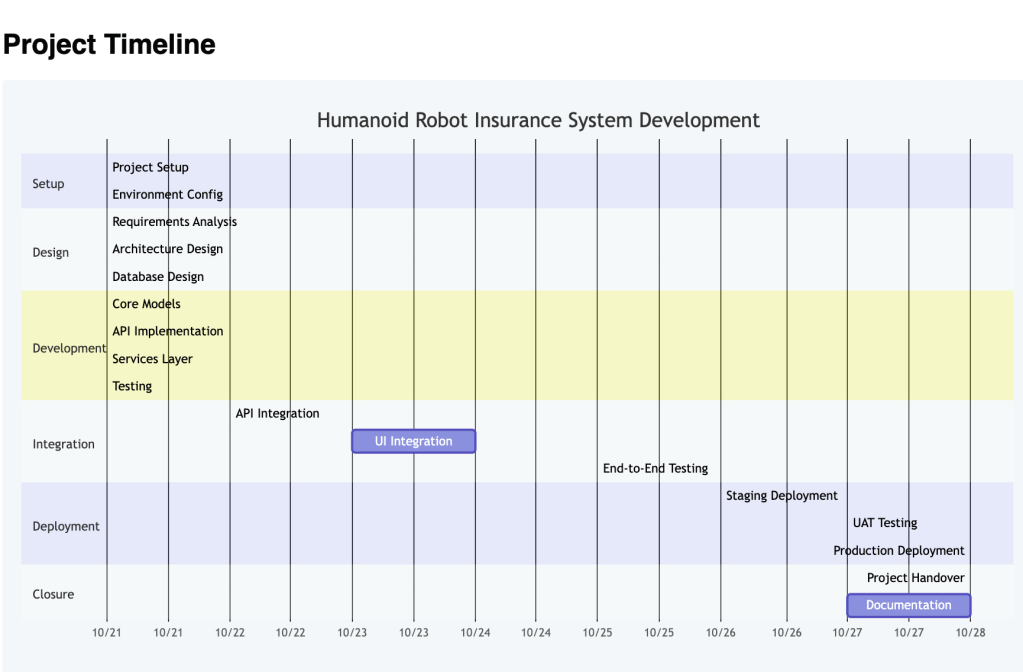
3. Project Timeline
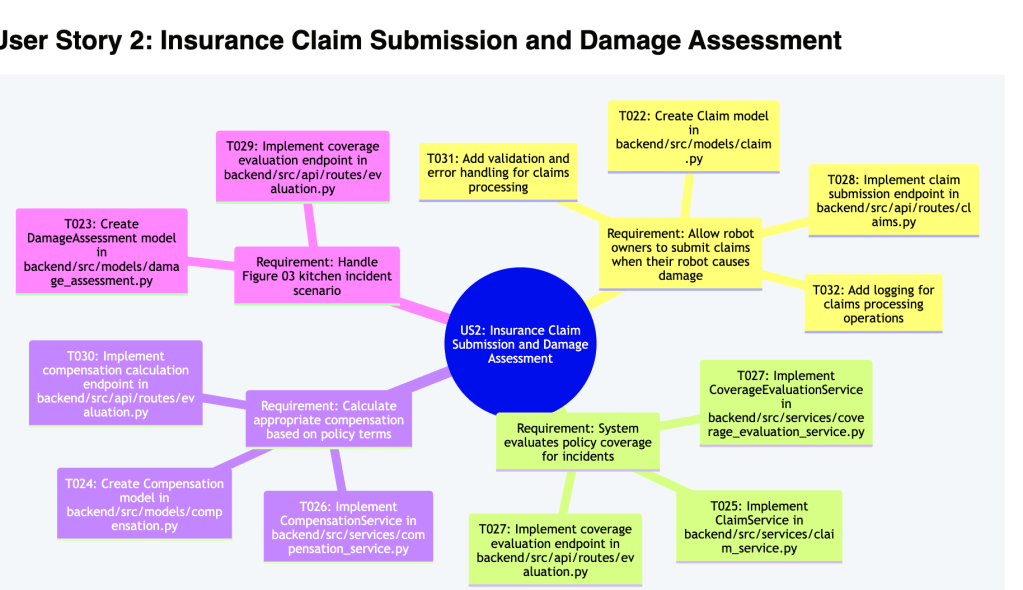
4. User Story analysis
5. Business Data Flow
Closing Words
Thanks for reading! The tools aren’t perfect — not yet — but they’ve helped us immensely in transforming ideas into working products faster than ever before. Martin Fowler team published another high level overview of the tools, you can read it and have another architects team view https://martinfowler.com/articles/exploring-gen-ai/sdd-3-tools.html
Migrate functions and stored procedures: You need to migrate the stored procedures from Oracle to PostgreSQL. It is the most complicated tasks, even google, AWS, Azure do not support for enterprise big requirement and demand. The million of migration and transition cost is always the main blocker to shift technology forward.
Objectives
Overing all the features from database like view, index, schema, stored procedures, functions, etc…
Know the limitation when the functions can’t find on target database.
Automation with Test pipeline.
Solutions
the solution is inspired by OpenAI GPT model. Converting the problem from Database Domain Special Programming Language Compiler into General NLP problem.
Features
No Coding for SQL compiler or Converter in DSL language.
Based on Large language models (LLMs), like OpenAI GPT or Google T5, Facebook llama
SQL GPT be adapted into different databases with different datasets.
Support any data objects: Tables, Views, Indexes, Packages, Partitions, Procedures, Functions, Triggers, Types, Sequences, Materialized View, Database Links, Scheduler, GIS, etc…
Reinforcement learning from Human Feedback(DBA) for language model. OpenAI Paper
Roadmap
Version 1: SQL GPT is verifying the possibility of this design by OpenAI GPT model and API.
Version 2: to extend model like open-source model like Google T5 model + clean dataset to build for enterprise demand.
System Architecture(in plan)
There are several components like SQL collector, Dummy-Data-Generator, SQLGPT service …
SQLCollector: Web Service to receive source SQL.
DataGenerator: Generate Dummy Data for Schema.
SQLGPT Service: Core Service to generate target SQL.
Models : V1 from OpenAI model; V2 from Google T5 Model.
SQLTrainer: training the model by new HumanFeedback Reinforcement learning.
Examples
Example 1: select top 100 customer from Oracle PL/SQL into Postgresql
### Oracle
SELECT id, client_id
FROM customer
WHERE rownum <= 100
ORDER BY create_time DESC;
### Postgresql
SELECT id, client_id
FROM customer
ORDER BY create_time DESC
LIMIT 100;
Example 2: A Transform SQL from Oracle PL/SQL into PostgreSQL PG/SQL
### Oracle
CREATE OR REPLACE PROCEDURE print_contact(
in_customer_id NUMBER
)
IS
r_contact contacts%ROWTYPE;
BEGIN
SELECT *
INTO r_contact
FROM contacts
WHERE customer_id = p_customer_id;
dbms_output.put_line(r_contact.first_name || ' ' ||
r_contact.last_name || '<' || r_contact.email || '>');
EXCEPTION
WHEN OTHERS THEN
dbms_output.put_line(SQLERRM);
END;
### Postgresql
-- A postgresql PG/SQL Procedure
create procedure print_contact(IN in_customer_id integer)
language plpgsql
as
$$
DECLARE
r_contact contacts%ROWTYPE;
BEGIN
-- get contact based on customer id
SELECT *
INTO r_contact
FROM contacts
WHERE customer_id = in_customer_id;
-- print out contact's information
RAISE NOTICE '% %<%>', r_contact.first_name, r_contact.last_name, r_contact.email;
EXCEPTION
WHEN OTHERS THEN
RAISE EXCEPTION '%', SQLERRM;
END;
$$;
Limitation:
SQL context is limited to the LLM max training token size now, T5 model need different datasets to feed. Testing Facebook LLLM model.
Infrastructure as code is not programming, it’s only configuration.
— as a software developer
With the big cloud migration wave, there are a lot of cloud provision and configuration effort. There is a modern name called “ Infrastructure as code “. But after AWS released in the market over 1 decade, it is still in earlier stage from a software engineer point view.
How is the definition of simplicity from Terraform point view? I have different options. Is boto3 complicated?
The main disadvantage for Terraform is the DSL language can’t test easily with Unit Test, Mock Service, Integration Test, E2E test like other modern language Python, Java. Many Infra Engineers or Architects are always challenging me, WHY need test? —– It’s like a joke.
However, there are some innovative solution is coming,
Which is providing modern programming productivity to make infrastructure as real code with quality.
import pulumi
from pulumi_aws import s3
# Create an AWS resource (S3 Bucket)
bucket = s3.Bucket('my-bucket')
# Export the name of the bucket
pulumi.export('bucket_name', bucket.id)
As today, there are maybe many existing legacies Terraform code or module in your organization which you can’t drop directly. I made a hand-on dirty to find a testable solution to maintain TF code. And today SonarQube support TF code check for AWS.
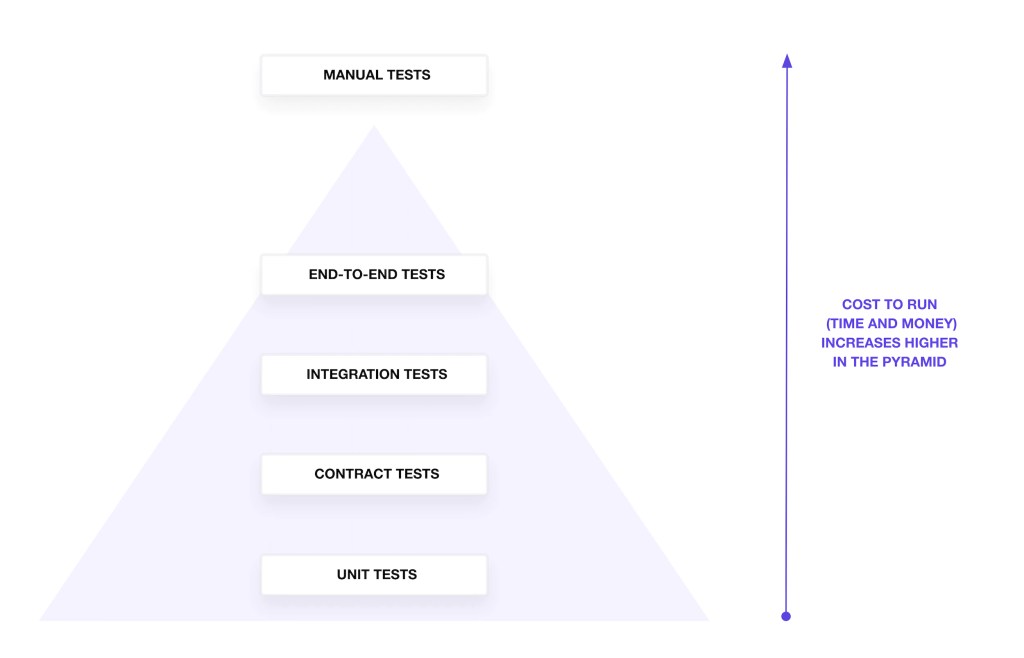
1. Overview of Test Cost
Cost to Run Test
2. Unit Test in Terraform
It is not really unit test, it is more grammar check and plan explanation.
terraform fmt -check
tflint
terraform validate
terraform plan
3. Integration Test Terraform
In terraform, you can apply to deploy your code at Integration Test Directly.
terraform show -json main.tfplan > main.tfplan.json
docker run --rm -v $PWD:/target -it eerkunt/terraform-compliance -f features -p main.tfplan.json
# https://github.com/terraform-compliance/cli a lightweight, security focused, BDD test framework against terraform.
5. Terraform Code Quality Check
Since last year, SonarQube supports Terraform Grammar and Security Check. It helps us reduce a lot manually setup and check.
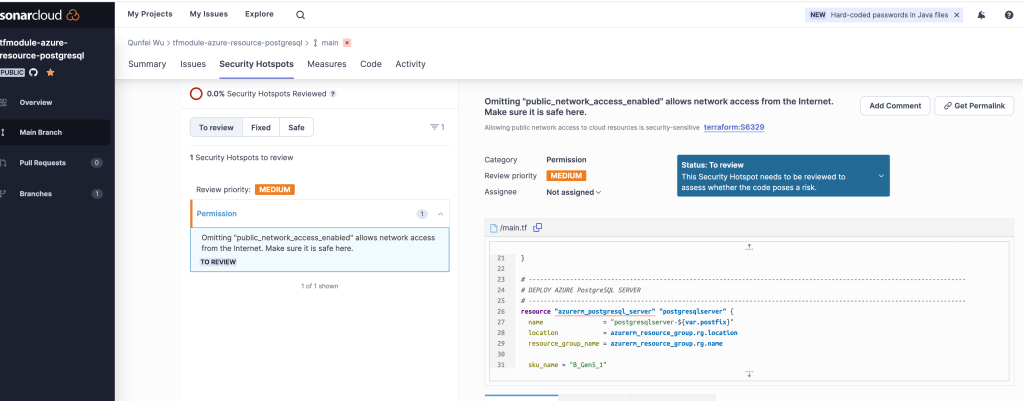
For example, this code has Omitting “public_network_access_enabled” allows network access from the Internet. Make sure it is safe here.
# public_network_access_enabled = true
# default is true, need to set false
public_network_access_enabled = false
Which developer can’t find it easily because public network access as default.
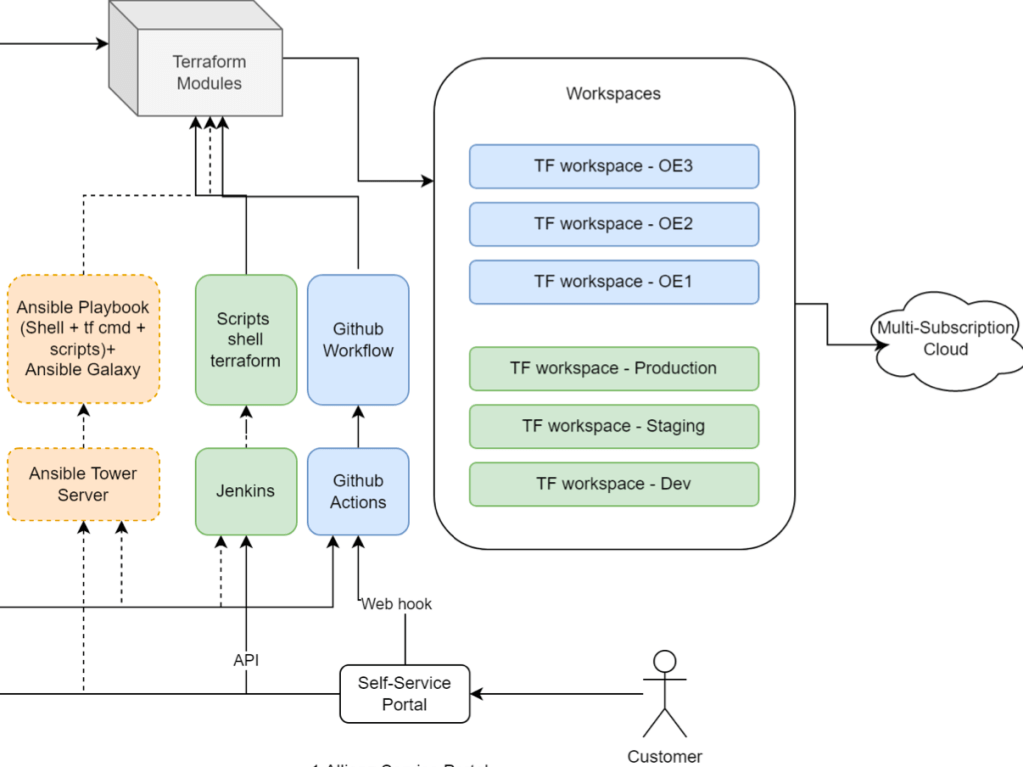
6. Making Terraform code callable
1. Shell spaghetti easily: Using some shell and scripts or github ci/cd or jenkins, the provision can work automation quickly and easily.
2. Integrating with automation tools : we can also use Ansible TF-module and define a play book to run automatically. Ansible TF model link Ansible Towner can explore their API easily to automation tools.
3. Crossplane Open API definition
It is a new design architecture from Crossplane which had considered each component can be callable by Open API definition.
To write infrastructure code goes straightforward, but the foundation of high-quality software mindset which is still missing in many cloud engineering daily job. In this blog, I summarized the existing marketing options, it may help someone like to improve their automation and quality in their infrastructure daily work.
Using Gitlab CI/CD and Github actions pipeline makes workflow for a single project quickly. There is always a pipeline file like .gitlab or .github/workflows in an individual project. But each developer or team need to maintain and update it regularly when there are bugs or updates.
In a big organization, there would be better to have a centralized team (e.g., Cloud Platform, Performance & Reliability Engineering, Engineering Tools) to develop standard tooling and infrastructure to solve every development team’s problems.
Pipeline for different applications is a common demand for software engineering, data engineering and data scientist. It can also help business developers focus on their business logic, and a centralized team can support the most updated stacks in the big organization.
A pipeline is a code. So how can we share and combine pipeline code with the business code quickly and smoothly? This article will share 3 patterns and anti-patterns with Jenkins features to achieve this goal. However, it does not limit you to using modern CI/CD tools like cloud pipelines like Azure Pipelines, AWS CodePipeline, Google Cloud build.
Patterns:
To set boundaries and separate responsibilities. Let specialists do the professional job.
Centralized pipelines in a centralized git repository, a centralized team to maintain, update and bug fix. CI can combine the various source code, pipeline and deployment in one building process.
To give the possibility and flexibility to the end developer to customize features and add new ideas.
Anti-Patterns:
Anyone can do anything. I am not sure whether it is good or bad, but asking data scientists to write a service deploy pipeline is too expensive, opposite asking DevOps to write an NLP pipeline is also challenging.
Each project has its pipeline. How to fix >100 repositories with the same legacy pipeline simultaneously? Don’t repeat yourself.
Control over Innovations. A centralized team does not have the capacity or passion for taking the responsibilities. Then the mess is coming, in the organization better have a mature-approve model to control innovation instead of killing the invention.
Economy effects
Depending on your organization size, if there are 1000 developers, each team has over 10 projects running on the production like today’s modern microservice pattern. And the pipeline bug fix needs 2 hours for a specialist, and a general developer needs to invest time to understand the context and solve it for 4 hours at the first time. Others same pipeline can be solved in 1 hour with previous experience.
Hour(x) = 1000(developers) x ( 1 (first project) x 4(hour) + 9(other projects) x 1(hour))
= 1000 x( 1 x 4 + 9 x 1)
= 13,000 h
Using Germany Munich Average Developer’s Salaries € 7000/Month
Cost(x) = 13000(h) x 7000(€)/22(D)/8(H)
= 13000 x 7000 /22/8
= 517, 045 €
In scaling economy, one specialist fixes a bug in the centralized repository pipeline, can save half a million for 2 hours consumed bug in 1000 developer’s organization.
Let’s do it in action.
Use case: build a pipeline that can support python flask web service, which can deploy to Azure Kubernetes service.
Create two repositories, one for source code one for pipeline code.
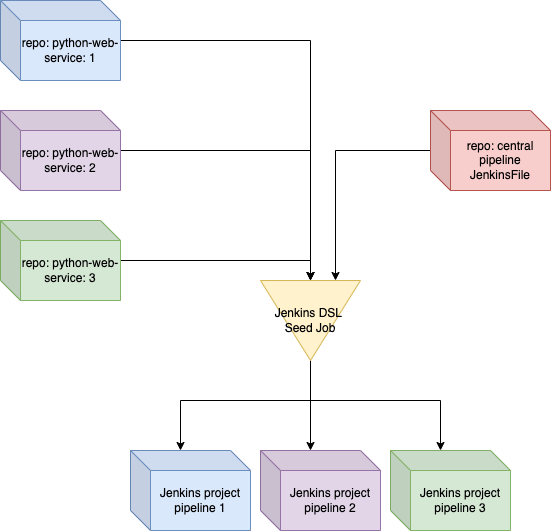
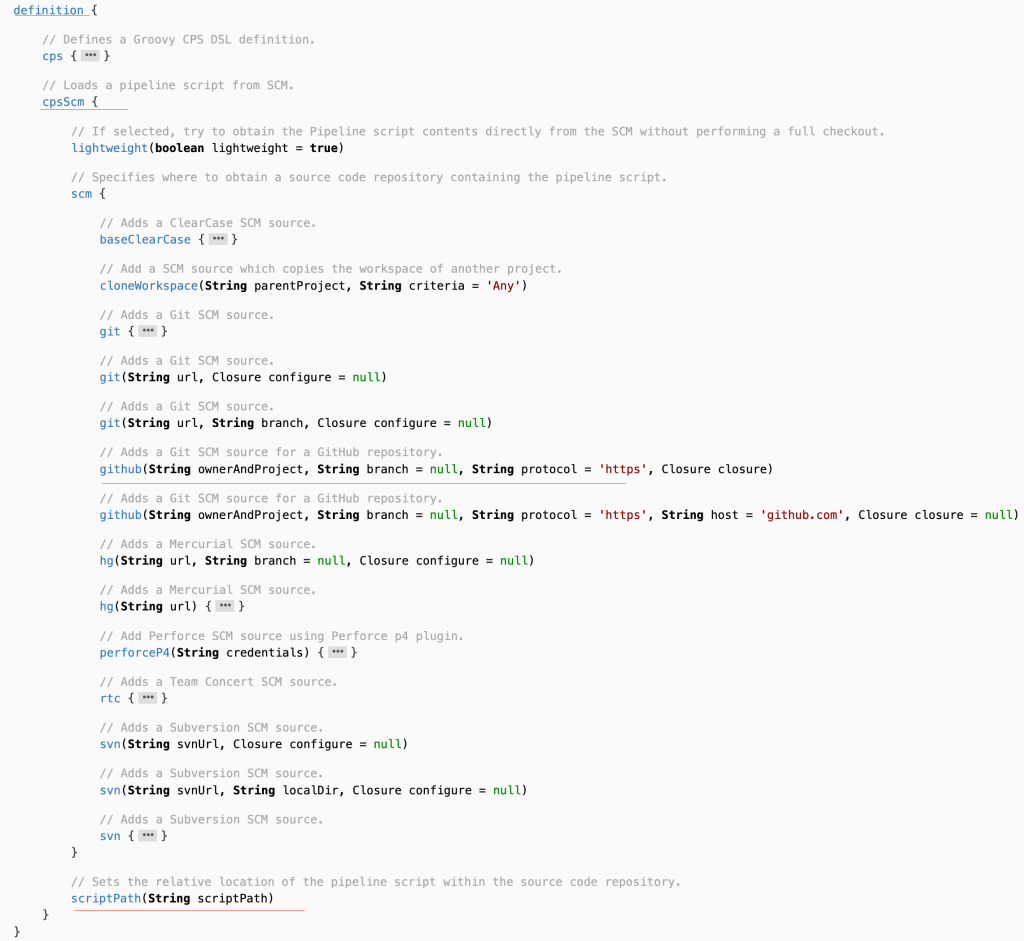
To use Jenkins DSL to create a similar pipeline for the same type of workflow with parameters, like spring boot application, python web application, etc…
ocr_service is classic python flask web service
Combine pipeline code and source code in the same CI job
The implementation is straightforward, but letting the team members and manager comprehend takes much more time. One of my working companies took at least two years to mature this idea, with some fantastic architects pushing the idea “pipeline driven organization” https://www.infoq.com/articles/pipeline-driven-organization/.
I hope my experience can inspire anyone to apply to your organization with Jenkins or other cloud CI/CD tools.
As aspiring Software Craftsmen we are raising the bar of professional software development by practicing it and helping others learn the craft. Through this work we have come to value:
Not only working software, but also well-crafted software.
Not only responding to change, but also steadily adding value
Not only individuals and interactions, but also a community of professionals
Not only customer collaboration, but also productive partnerships
That is, in pursuit of the items on the left we have found the items on the right to be indispensable.
Business is constantly changing. How to design a scalable python application in the data scientist and data engineering world?
It is no one mature enterprise-level framework in python data world compared Java’s Enterprise frameworks like springboot, microprofile, etc…. but I try to use dependency Injection and configuration pattern to clean python code.
Use Case
There is a nlp processing in financial project, but with more different business case in need, configuration and dependencies becomes overwriting and missing conf or cyclic dependency in python.
We build an NLP example service following the dependency injection principle. It consists of several services with a NLP domain logic. The services have dependencies on database & storage by different providers. In the meanwhile, the configuration can also be Inheritance by python @dataclass and supported hydra.cc framework.
Refactoring
high cohesion and loose coupling recap.
1. Coupling is the degree of interdependence between software modules, tightly coupling modules can be solved by dependency Injection pattern.
2. Complicated Configuration can be extend, validate, Inheritance by Hydra.cc and pydantic framework.
Configuration
Assembling Processing
there are 3 main steps to handle configurations
Load configuration from YAML into python dataclass by Hydra.cc framework which developer by facebook team.
Using Pydantic library’s annotation(@validate) to check the value of your configuration
Set the configuration into container, container injects this configuration into different services easily. DI library called python dependency injection
from pydantic import validator
from pydantic.dataclasses import dataclass
@dataclass
class MySQLConfig:
driver: str
user: str
port: int
password: str
@validator('port', pre=True)
def check_port(cls, port):
if port < 1024:
raise Exception(f"Port:{port} < 1024 is forbidden ")
return port
Personally experience, I prefer to dataclass instead of pydantic BaseModel. In fact pydantic has pydantic.dataclasses which looks like dataclass and support @valiator annotation.
@hydra.main(config_path="", config_name="config")
def my_app(cfg: MySQLConfig) -> None:
"""1. to get config yaml by hydra"""
cfg_dict = dict(cfg)
"""2. to validate the configuration by pydantic"""
MySQLConfig(**cfg_dict)
container = MyContainer()
"""3. to load configuration into container"""
container.config.from_dict(cfg_dict)
nlp = container.nlp_service_factory()
nlp.run_nlp()
if __name__ == "__main__":
my_app()
Finally Results
2022-02-10 20:11:59.873 | INFO | src.gateway:download:43 - download from AWS S3 blob Storage
2022-02-10 20:11:59.873 | INFO | src.services:ocr_preprocess:48 - BankNLPService OCR preprocess done
2022-02-10 20:11:59.873 | INFO | src.services:tokenizer:51 - BankNLPService Tokenizer done
2022-02-10 20:11:59.873 | INFO | src.services:chunker:54 - BankNLPService Chunker done
2022-02-10 20:11:59.873 | INFO | src.services:post_process:57 - BankNLPService post process done
2022-02-10 20:11:59.873 | INFO | src.services:post_process:58 - {'driver': 'mydriver', 'user': 'root', 'port': 3306, 'password': 'foobar'}
2022-02-10 20:11:59.873 | INFO | src.gateway:save:20 - Saved in Mysql
It is a simple practise to clean python code with 3 libraries